
One of the most important reasons we claim WP Statistics is a great alternative for GA4 is that it’s fully compliant with GDPR.
Table of Contents
Apart from the advanced and accurate tracking services it offers, it respects privacy and intentionally avoids collecting, storing, or using Personally Identifying Information.
If you want to make sure whether WP Statistics is GDPR compliant before installing it, read the following blog post. We’ll explain the key requirements of GDPR and the way WP Statistics complies with them.
What is GDPR?
Before understanding WP Statistics’ compliance policies, it’s good to know what GDPR actually is and why it matters in web analytics.
GDPR stands for General Data Protection Regulation and is the data privacy law in the European Union.
It was introduced in 2018 and is now one of the most important privacy rules in the world. Many other countries consider the GDPR a benchmark for personal data protection and privacy policies.
GDPR applies to any business or organization that collects or processes personal data of people located in the European Economic Area.
The purpose of this regulation is to give people greater control over their personal information.
GDPR defines clear responsibilities for organizations that collect and use European people’s data, even if your business is located outside Europe.
Key GDPR Principles
Here are the core principles of GDPR that you need to consider when handling people’s data in the EU:
- Lawfulness, Fairness, and Transparency: Your business must define a legal basis for collecting personal data. You must clearly explain what data you want to collect and why you want to have the data.
- Data Minimization: You’re only allowed to collect the data necessary for a specific purpose.
- Purpose Limitation: You can only collect data for the purposes you clearly defined. So, you’re not allowed to use it for unrelated activities.
- Accuracy: You have to take reasonable steps to make sure people’s personal data remains accurate and up to date.
- Storage Limitation: You can not keep personal data longer than necessary.
- Integrity and Confidentiality: You need to take appropriate security measures to protect personal data from unauthorized access, loss, or misuse.
- Accountability: You have to show that you’re complying with GDPR requirements.
Why GDPR Matters for Website Analytics
You might ask what the relationship between GDPR and website ownership is. As you know, every website needs a tracking tool to make sure it’s performing well.
The thing is that analytics tools usually collect information that may be regarded as personal data under GDPR.
For example, to analyze user behavior, they need to collect data like:
- IP addresses
- Unique identifiers
- Cookies
- Device information
- Location data
- Browsing behavior
Many analytics platforms try to create detailed visitor profiles using methods like storing cookies on users’ browsers.
Cookies collect and store personal data and give analytics tools to track people across various sites.
If you want to comply with GDPR, you may have to get explicit consent from users for these activities.
Here are the GDPR requirements for website analytics:
| GDPR Requirement | What It Means for Website Analytics |
| Transparency | Visitors should know what analytics data is collected |
| Lawful Basis | You need a legal basis for processing analytics data |
| Data Minimization | Collect only data necessary for analytics |
| Security | Protect stored analytics information |
| Storage Limitation | Delete data when you no longer need it |
| User Rights | Allow users to know their privacy rights |
| Consent Requirements | Get consent before collecting data |
| Accountability | Document your compliance decisions and practices |
Analytics tools that collect less personal information, anonymize data, or avoid tracking cookies generally present fewer compliance challenges.
How WP Statistics Collects, Stores, and Processes Data?
Now that you know what GDPR is, we need to review the data processing method of WP Statistics to understand if it’s compliant.
How WP Statistics Tracks Visitors Without Cookies
Here at WP Statistics, we claim that we don’t use cookies to collect visitors’ data and track your site’s performance.
Let’s see how it’s possible:
WP Statistics uses an anonymized JavaScript method to collect and store data. In fact, when a visitor loads a page, WP Statistics uses a script for data collection and also uses other sources, such as:
- The visitor’s IP address
- Browser and device information (User-Agent)
- Request-related data such as page URLs and referrers
The important point is that WP Statistics does not store this information in its original form. In fact, it anonymizes visitor data and hashes it before storage.
In other words, WP Statistics treats visitors as anonymous users, not people with personality and identity. So, there will be minimal concern about using personal information.
This is the most significant difference between a privacy-focused tool like WP Statistics and traditional tracking platforms that use cookies.
How WP Statistics Recognizes Unique Visitors
You might ask how WP Statistics can give you an accurate measure of unique visitors while it doesn’t store personal info.
WP Statistics counts unique visitors using a privacy-focused method. Instead of using a persistent identifier, it generates a temporary anonymous identifier.
This temporary identifier contains three important parts:
- An anonymized IP address
- The visitor’s User-Agent string
- A daily rotating salt value
When you enable the Hash IP address Option on WP Statistics, it generates the identifier using a hashing process, like:
hash (Daily Salt + IP Address + User Agent)
The daily salt is a randomly generated value that changes every day. As the salt changes daily, visitor identifiers cannot be linked across multiple days.
Also, creating long-term behavioral profiles is not possible using this method. The important drawback of this method is that counting returning visitors over time is almost impossible.
As a result, the same person who visits your site today and tomorrow may be counted as a different unique visitor.
So, despite the fact that privacy protection will increase, you must ignore some metrics in your analytics. Remember that this is an intentional privacy trade-off, not a lack of capability.
This approach allows WP Statistics to estimate (not measure) your unique visitors without storing cookies. Also, you avoid profiling users for a long period, improving your site’s compliance.
This cookie-free approach has several privacy advantages, including:
| Feature | Privacy Benefit |
| No cookies | Reduces tracking concerns |
| IP anonymization | Protects visitor identities |
| Daily rotating salt | Prevents long-term profiling |
| Local data storage | Keeps data under the website owner’s control |
| No cross-site tracking | Visitors are not tracked across different websites |
What Data WP Statistics Collects
Apart from the method of data collection, it’s important to know the data WP Statistics collects to use in analytics.
1. Visitor Data
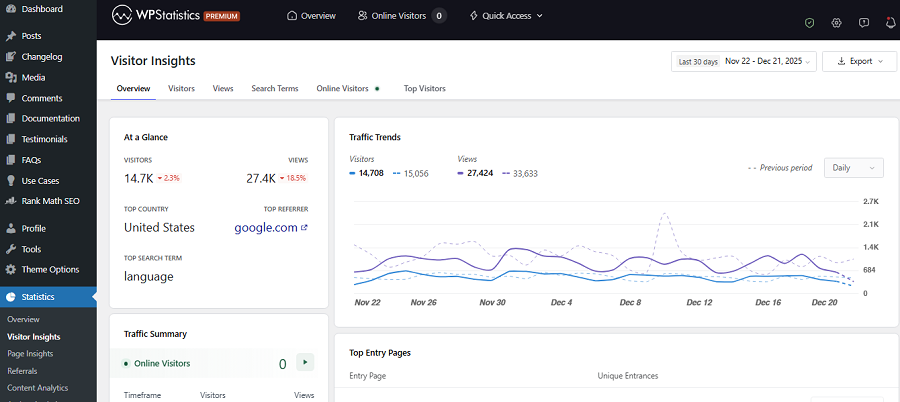
This plugin records website views and visitor activity. This is essential for tracking traffic trends on your site.
Here is a list of metrics WP Statistics offers about visitors:
- Number of views
- Visitor counts
- Logged-in users
- Landing pages
- Online visitors
- Internal search terms
2. Page Views
WP Statistics can track single page views across your website. This helps you identify:
- Popular content
- Traffic patterns
- User engagement
- Content performance
- Author analytics
3. Referrers
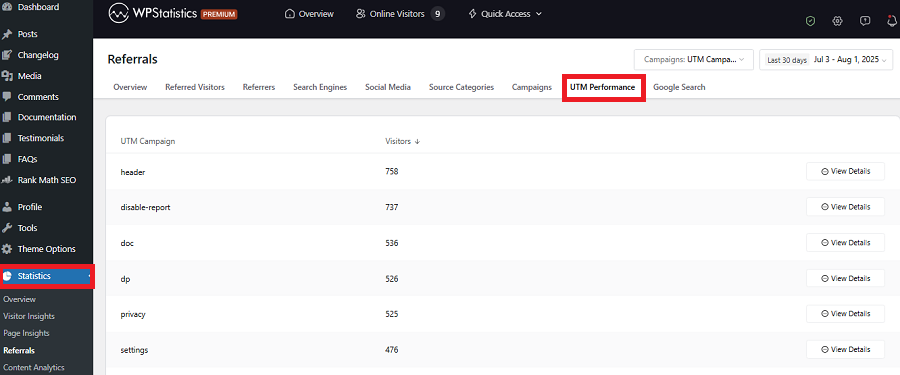
The plugin can collect the source of your traffic. Then, it will segment your traffic into groups like:
- Search engines
- Social media platforms
- External websites
- Direct visits
4. Device Information
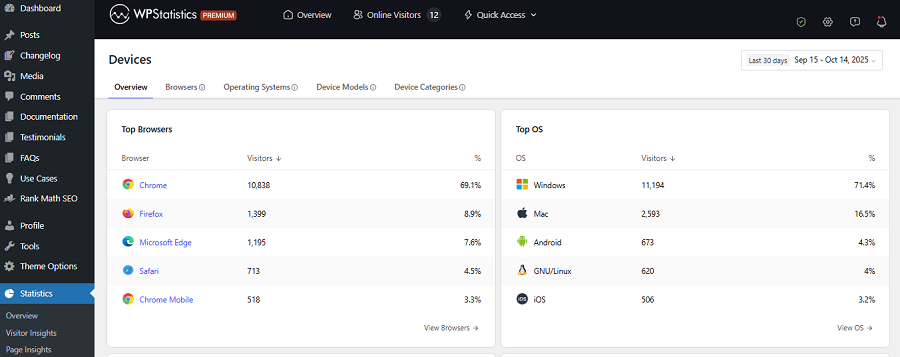
WP Statistics will collect some technical details of your visitors’ devices, including browser type, operating system, device category, and screen-related information.
5. Geographic Information
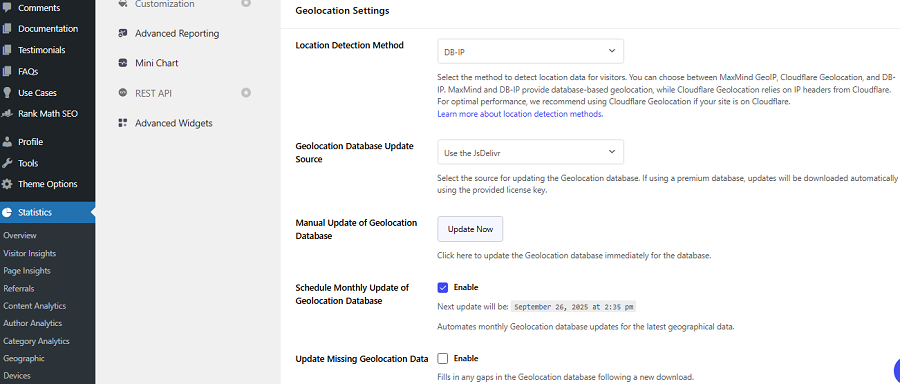
The plugin can collect the location of visitors and create location-based segments that show where your site’s visitors are coming from.
This information comes from processing IPs of visitors without profiling or storing them. WP Statistics gives the location-based reports as a map.
Where WP Statistics Stores Visitors’ Data
Last but not least, one of the most significant differences between WP Statistics and cloud-based analytics platforms is data storage.
Let’s review key points:
Local Database Storage
WP Statistics stores analytics data within your WordPress database. So, you can be sure that your visitors’ data won’t be sent to any third-party analytics provider.
In fact, your data remains under your control, and information stays in your hosting environment.
This level of data ownership ensures compliance with certain privacy considerations.
Third-Party Integration
Although WP Statistics stores data locally, as a website owner, you should review any other optional integrations, add-ons, or external services you have enabled on your dashboard.
Is WP Statistics GDPR Compliant?
Now, we can answer the question of whether WP Statistics is GDPR compliant:
The Short Answer
Yes, WP Statistics is GDPR compliant by default, but you need to pay attention to the configuration.
WP Statistics provides privacy-focused/GDPR-supporting features, but remember that final compliance depends on site configuration and legal context.
Based on what we explained about the way WP Statistics collects, stores, and processes data, WP Statistics is a privacy-focused analytics tool.
It stores data locally, supports IP anonymization, and can track visitors without using cookies.
These characteristics are exactly based on core GDPR principles, including:
- Data minimization
- Transparency
- Security
- Storage limitation
Remember that this doesn’t automatically make your website automatically GDPR compliant. You need to pay attention to configurations.
To make sure, go to your dashboard and click Settings under Statistics. Now, click Privacy & Data Protection to see the privacy customization settings.
Here, you can change the default of the plugin’s privacy configurations, including:
| Feature | Function | Benefit |
| IP Anonymization | Masks IP addresses | Better privacy protection |
| IP Hashing | Creates anonymous identifiers | No readable IP storage |
| Privacy Audit | Reviews privacy settings | Easier compliance checks |
| Consent Integration | Respects consent preferences | Supports GDPR requirements |
| Do Not Track | Honors DNT requests | Respects user privacy choices |
Changing any of these configurations can impact your site’s compliance. Sometimes you need to enable a consent banner because of the changes you make.
How WP Statistics Supports GDPR Compliance
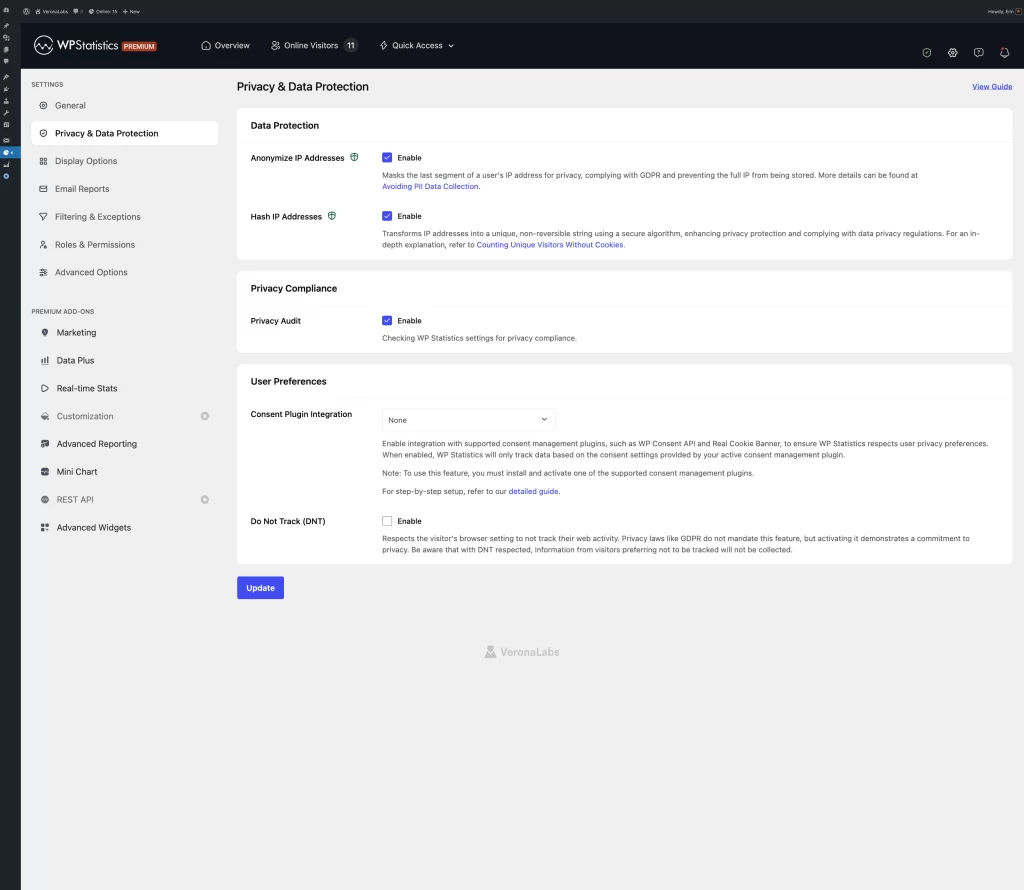
WP Statistics offers several privacy-friendly features that help you meet GDPR requirements:
- Cookie-free visitor tracking helps you reduce reliance on consent.
- Local data storage reduces data transfer and increases its safety.
- IP anonymization helps you minimize personal data processing.
- Data retention allows you to delete old analytics data when it is no longer needed.
- Full data ownership gives you control over visitor information.
Practical Analytics Privacy Checklist Before Using WP Statistics
- Anonymize IPs: Mask or truncate IP addresses where possible.
- Use cookie-free tracking: Avoid cookies and persistent IDs when they aren’t necessary.
- Set data retention: Automatically delete data you no longer need.
- Get consent: Use a compliant cookie banner for non-essential tracking.
- Update privacy policy: Explain data collected, purpose, retention, and third-party providers.
- Sign a DPA: Have a Data Processing Agreement with analytics providers when required.
Does WP Statistics Comply with Other Regulations?
WP Statistics is compliant with GDPR, but its privacy measures help you automatically stay compliant with other privacy regulations.
1. ePrivacy Directive (Cookie Law)
The ePrivacy Directive focuses on the confidentiality of information and regulates the use of cookies and similar tracking technologies on websites.
As said earlier, WP Statistics does not use tracking cookies or other persistent identifiers. So, it can simplify compliance with European cookie laws, including ePrivacy.
2. UK GDPR and PECR
After Brexit, the UK retained GDPR principles through UK GDPR. It also defines privacy rules through the Privacy and Electronic Communications Regulations (PECR).
WP Statistics’ cookie-free tracking model, IP anonymization features, and local data storage align well with these requirements.
The plugin has specifically considered PECR among the privacy frameworks to comply with by default.
3. Swiss FADP
Switzerland’s Federal Act on Data Protection (FADP) focuses on transparency, proportionality, and responsible personal data handling.
Although WP Statistics has not considered this regulation in mind, its privacy features and data ownership measurements are generally compatible with Swiss privacy regulations.
For more accurate compliance, you have to consider the requirements one by one.
4. CCPA and CPRA
The California Consumer Privacy Act (CCPA) and California Privacy Rights Act (CPRA) give consumers control over their personal information.
WP Statistics is designed to be a CCPA-compliant analytics solution apart from GDPR.
It avoids cookies, limits personal data collection, and keeps data under the website owner’s control. So, you don’t have any compliance concerns associated with traditional analytics tools.
Here is a summary of WP Statistics’ compliance with important privacy frameworks:
| Regulation | WP Statistics | Why |
| GDPR | Yes | Cookie-free tracking |
| ePrivacy Directive | Yes | No tracking cookies by default |
| UK GDPR | Yes | Similar to GDPR requirements |
| PECR | Yes | No cookie-based analytics |
| Swiss FADP | Generally Yes | Privacy and data-minimization principles |
| CCPA/CPRA | Yes | Limited data collection and local storage |
Final Thoughts
If you’re looking for a privacy-friendly analytics plugin for your WordPress site, WP Statistics is a great choice.
It uses a cookie-free tracking method and offers a local data storage model. Also, it offers detailed privacy configuration options that let you customize data handling settings to your requirements.
It’s GDPR/CCPA-compliant by default and meets the compliance requirements of many other frameworks.
Remember that even with a privacy-friendly analytics plugin like WP Statistics, you’re still responsible for checking your privacy compliance.
Try to clearly explain analytics usage in your privacy policy page and review the requirements regularly. If you need more information about compliance issues, don’t hesitate to contact us.
FAQs
Is WP Statistics GDPR compliant?
WP Statistics offers privacy-focused features such as local data storage, data ownership, and IP anonymization options. It’s GDPR-compliant by design.
Does WP Statistics use cookies?
WP Statistics does not use cookies. Instead, it runs a script to collect and store visitors’ information anonymously.
Does WP Statistics collect IP addresses?
WP Statistics can process IP-related information for analytics purposes. However, it hashes IPs so that you can be sure about the privacy and confidentiality of your visitors.