

Creating an account on a web analytics platform doesn’t guarantee that you’re tracking your website’s performance accurately.
Table of Contents
Each analytics platform uses different methods to collect and process data, which can affect the accuracy of analytics results. Your website configuration and tag management system can also have a significant impact on the data you collect.
That’s why you need a well-defined monitoring strategy to improve analytics data quality and ensure more reliable insights.
In this guide, we’ll cover website analytics best practices to help you have accurate website analytics.
Why Analytics Accuracy Matters
Without data, you have to decide based on guesses, and this will lead to financial losses. Here is why you need to make sure of the accuracy of your analytics data:
1. Make better marketing decisions
If you want to know which campaigns are performing well, you need accurate traffic, conversion, and campaign data.
Accurate data lets you allocate budget to the best campaigns and channels based on previous trends, not guesswork.
2. Evaluate SEO and content performance
SEO and content teams should understand what is working and where improvements are needed.
Reliable data makes it easier to find issues and improve on-site, off-site, and technical SEO. Organic traffic, engagement, and conversion data can help SEO specialists evaluate website performance.
3. Measure revenue
As a business owner, you have to know how many users complete important actions on your site, such as purchases, sign-ups, or form submissions.
This gives you a reliable view of your website’s ability to reach business results. Without an accurate website tracking strategy, you can’t be sure if you have enough conversions.
For example, making mistakes in defining events can cause errors in measuring conversions and your site’s revenue.
4. Improve attribution and customer journey analysis
An accurate tracking workflow across domains, campaigns, and touchpoints helps you understand how users interact with your website.
If the accuracy of your analytics data is not acceptable, you can’t be sure which channel or campaign has been more successful.
Otherwise, if you use an accurate analytics setup, your attribution reports and customer journey analysis will be more useful. So, you can identify the channels that contribute to conversions.
5. Identify real performance changes
Sometimes your analytics setup won’t let you distinguish changes in traffic or conversions from technical problems.
This is only possible if you use reliable analytics data. For example, a sudden drop in conversions might be due to a business problem or a mistake in tag management. You have to be sure that you’re tracking reliable data to detect the problem accurately.
6. Make forecasts and reports
Without a reliable tracking platform, you can’t predict your business growth and revenue in future campaigns. If you’re running a marketing agency and want to create a report for customers with predictions about the next year, you need to have an accurate web analytics platform.
Website Analytics Best Practices to Improve Accuracy
Here is what you need to do to get the most accurate data for analyzing your site’s performance:
1. Define Clear Analytics Goals and KPIs
Before starting your web analytics, you have to define your goals to know what you actually want to learn about your site.
Also, you need to write down the KPIs that you want to track to measure your success in reaching your goals.
A key performance indicator (KPI) is a metric that helps you evaluate your set objective. You need to select KPIs among the numerous data points your web analytics tool offers. Many of these metrics won’t give you useful insights. So, you can’t use them to measure your business goals.
Without defining your goals and KPIs to measure your performance, you can’t expect an accurate web analytics experience.
For example, if you want to increase your site’s engagement and build a community, you can’t focus only on traffic data.
Also, you need to define your goals more clearly and make them measurable. It’s good to determine the metrics you want to consider for measuring engagement to know what you have to focus on.
Your goals and KPIs might be different depending on your business. Look at the following table to compare various industries’ goals and KPIs:
| Industry | Goal | Primary KPIs | Secondary KPIs |
| E-commerce | Increase sales | Conversion rate, Revenue | AOV, Cart abandonment |
| SaaS | Increase sign-ups | Trial sign-ups, Activation rate | Demo requests, Churn |
| B2B services | Generate leads | Qualified leads, Lead conversion | Form submissions, Cost per lead |
| Publisher / Blog | Increase engagement | Engaged sessions, Return visitors | Pages/session, Scroll depth |
| Online community | Build community | Registrations, Active users | Comments, Repeat visits |
| Travel | Increase bookings | Booking rate, Revenue | Search-to-book rate, AOV |
| Real estate | Generate inquiries | Lead submissions, Contact rate | Property views, Phone clicks |
2. Use a Consistent Tracking Setup
Now, you have to choose your tracking tool and set up your tags to have a consistent measurement platform.
You need to consider the scale of your website, budget, and required metrics before selecting your analytics tool and setting up the tags.
Also, you have to take care of your tracking tags because any mistakes can cause inaccuracy in the results.
Common problems regarding tracking tags are:
| Tracking issue | Typical results | Reason |
| Duplicate tag | High events/pageviews | Tags installed in multiple locations |
| Missing tag | Some pages have little or no data | Template or implementation omission |
| Duplicate event | One click produces two events | Multiple triggers or handlers |
| Inconsistent event name | Similar actions appear separately | No naming strategy |
| Missing parameter | Reports lack useful context | Parameter not sent or configured |
| Old tracking code | Unexpected events continue after migration | Legacy implementation not removed |
So, it’s important to build a strong strategy and a clean tracking setup before starting your web analytics project.
3. Audit Your Analytics Tracking Regularly
Even the strongest strategies need auditing because the market and competition are not rigid. Moreover, your developers might implement new templates, new campaigns get launched, and new plugins are installed.
So, you can’t set and forget your analytics setup forever if you want to have an accurate measurement of your site’s performance.
A regular audit helps you make sure your analytics setup works well, and the new changes won’t impact its accuracy.
Here is a typical audit process:
- Critical Pages: List your critical pages and user journeys.
- Events: List your important events and conversions.
- Customer Journey: Test the visitor journey manually to make sure there is no friction.
- CTA Test: Confirm that the expected CTAs work.
- Duplicate events: Look for duplicate events and remove them.
- Spikes & Drops: Investigate sudden changes in traffic or conversions.
- Tags: Review recent website and tag-management changes.
4. Filter Out Internal and Unwanted Traffic
Your analytics should focus on real activity on your site. So you need to filter out the traffic generated by employees, developers, marketing agencies, and testing teams.
This is particularly significant on small and mid-sized websites. If these activities are mixed with customer traffic, your engagement and conversion reports can become misleading.
Traffic filtering is one of the most important website analytics best practices. If you want more accurate data, you have to exclude your site’s internal traffic.
Try to detect common sources of unwanted traffic and set your website analytics tools so that it filters out these sources accurately.
Web analytics tools offer IP address exclusion or other types of filtering by location, role, bot, VPN, etc.
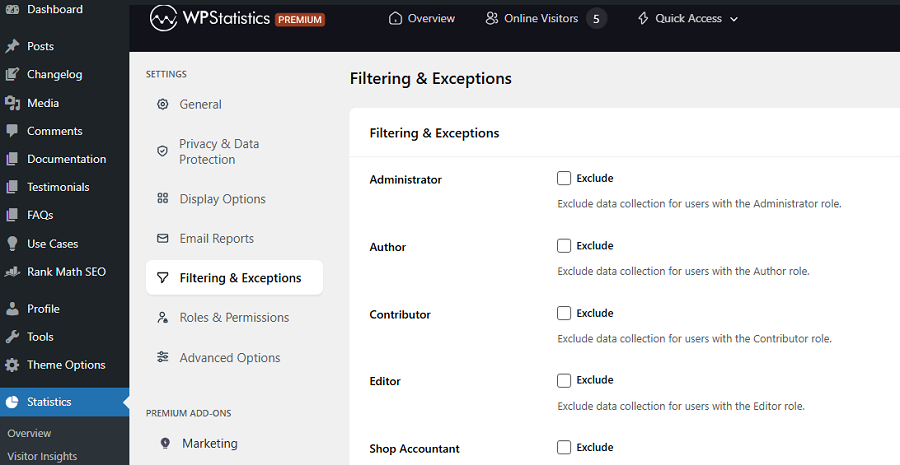
Make sure that you’ve set this option correctly to make sure about the accuracy of your data.
5. Interpret Events and Conversions Correctly
Sometimes you might have an accurate setup but interpret the results wrongly. Take a look at the simple customer journey that your analytics setup tracks:
Pageviews → Events → Key events/conversions → Business outcomes
Your analytics tool tells you the number of each of these metrics, but it doesn’t tell you what it means.
For example, if you have a webpage with a form, your analytics tracks:
- Form viewed
- Form started
- Form field interaction
- Submit button clicked
- Form successfully submitted
- Qualified lead created
The important thing is that these are not equivalent.
If you consider every button click a conversion, a visitor who clicks “Submit” but receives a validation error is counted as a successful lead. But we know that there is a problem.
Try to understand the weight of each activity and its influence on your business goal. For some events, a low conversion rate might not be a problem, but for key events, the story is different.
6. Implement UTM Parameters Consistently
UTM parameters help your analytics platform understand where your campaign traffic came from.
Common UTM parameters are:
| Parameter | Purpose | Example |
| utm_source | Traffic source/platform | |
| utm_medium | Marketing channel | paid_social |
| utm_campaign | Campaign name | summer_sale |
| utm_content | Creative/link variation | video_a |
| utm_term | Keyword or targeting term | running_shoes |
| utm_id | Campaign identifier | SUMMER26 |
Remember that UTM values are case-sensitive, so you can’t use Facebook instead of facebook. If you don’t pay enough attention to this point, you’ll collect the wrong data.
This is a sample UTM link:
utm_source=facebook&utm_medium=paid_social&utm_campaign=summer_sale
It’s essential to document your naming rules and make sure that everyone on your team follows them when creating campaign links.
Another important point is that you should not add campaign UTMs to internal links. UTMs are specifically useful for identifying incoming campaign traffic.
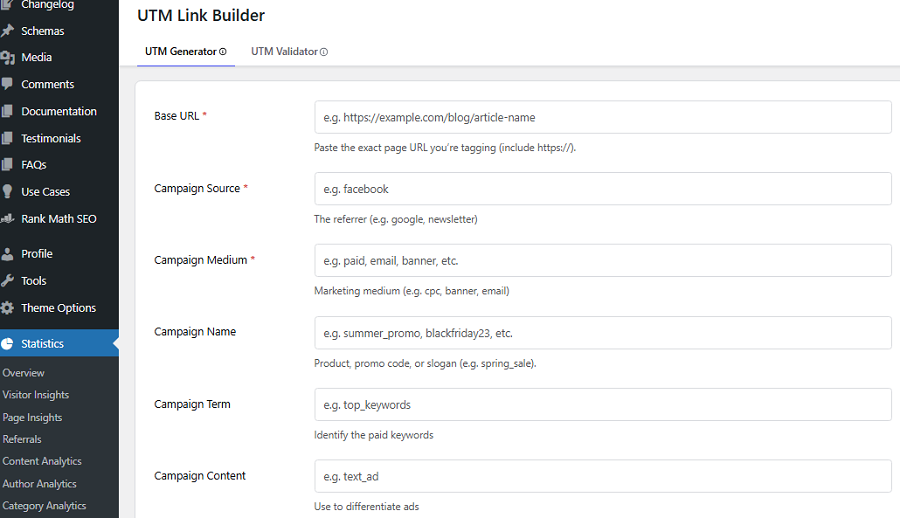
If you use them as internal links, the accuracy of your campaign data will decrease.
7. Manage Cross-Domain Tracking
If you have an ecommerce website, you probably need a cross-domain analysis to cover the whole customer journey.
A customer journey does not always stay on one domain. To understand that, look at the following sample:
example.com → shop.example.com → checkout.example-payments.com
If you don’t consider these domains appropriately in your website analytics setup, you will interpret only parts of the customer journey.
This mistake will significantly decrease the accuracy of your data and lead to wrong decisions.
You need to keep the continuity of the measurement journey where appropriate.
If you have an incorrect cross-domain tracking configuration, you can face problems like:
- Self-referrals
- Unexpected referral sources
- Fragmented sessions
- Duplicate-looking journeys
- Misleading attribution
8. Obtain Accurate User and Session Data
One of the most common mistakes in analytics reporting is assuming that a user, session, and person are the same.
Analytics platforms use technical identifiers, cookies, sessions, and consent signals to recognize users, sessions, and views. However, they might make mistakes.
The most important reason is that a single person might use different devices, locations, IPs, and networks when visiting your site.
The accuracy of these metrics strongly depends on your web analytics setup and the method it uses to track these details.
Many times, the platform may not be able to recognize a person as one user. So, you can’t obtain an accurate understanding of the true audience size.
9. Match Analytics and Website Configurations
Your analytics setup should be updated with your website. For example, if a developer changes a form on your site, your analytics implementation needs to change too.
Also, if the URL structure changes, you have to review reports and filters. Here are some other important website changes to monitor:
- Website redesigns
- New forms
- New buttons
- CMS migrations
- URL changes
- Checkout changes
- New subdomains
- New domains
- Consent-management changes
- Tag manager changes
- Major plugin or theme changes
Sometimes, tracking these changes will be difficult, especially for large websites. In this case, a simple tracking-change log can prevent many problems.
10. Use Data Validation and Quality Checks
Before trusting your analytics data, you should validate it. This means you have to check whether the data generated by your analytics implementation is accurate and as expected.
Here is a summary of what you can do:
- Test real user journeys: Perform important actions yourself and confirm that your analytics platform records them. For example, submit a form, complete a purchase, click a phone link, sign up for a newsletter, or start a checkout.
- Use debugging tools: Some analytics platforms provide real-time or debugging features. This lets you inspect events and parameters as they are generated. Use them to find wrong event names, missing parameters, or duplicate events.
- Compare analytics with another system: For transactions, compare analytics purchases with your e-commerce or backend records. For leads, compare recorded conversions with actual CRM leads.
- Monitor changes over time: You should not focus only on the status numbers. It’s essential to track trends to find key issues that prevent your site from receiving traffic and conversions.
Finally, try to create a checklist for your analytics setup to make sure you’ve considered everything before launch.
Here is a sample checklist for small websites:
| Item | What to Verify |
| Tracking code | Installed on all pages |
| Tracking ID | Correct property/ID |
| Data collection | Active and consistent |
| Pageviews | No missing or duplicate views |
| Events | Correct event names |
| Conversions | Key actions tracked |
| UTM tags | Consistent campaign parameters |
| Referral traffic | Unwanted referrals excluded |
| Internal traffic | Staff visits filtered |
| Bot traffic | Known bots excluded |
| Cross-domain tracking | Domains configured correctly |
| Self-referrals | No unexpected self-referrals |
| URL tracking | Parameters handled correctly |
| Consent settings | Tracking respects user consent |
| Filters | Test filters before activation |
| Data anomalies | Traffic spikes reviewed |
| Goals & KPIs | Metrics match business goals |
| Reports | Data matches source systems |
| Integrations | Connected tools work correctly |
| Tracking audits | Regular checks scheduled |
How to Stay Privacy-Compliant While Increasing Accuracy
Although web analytics accuracy is important, you can’t ignore people’s privacy and collect personal information simply because you want accurate data.
Unfortunately, being more accurate is sometimes equal to using invasive methods for collecting highly personal information.
This is what you need to pay more attention to because privacy concerns have become really serious in recent years. Remember that governments consider heavy penalties for breaking privacy rules like GDPR and CCPA.
Here are website analytics best practices to collect accurate data without violating privacy regulations:
1. Use Privacy-Friendly Website Analytics Tools
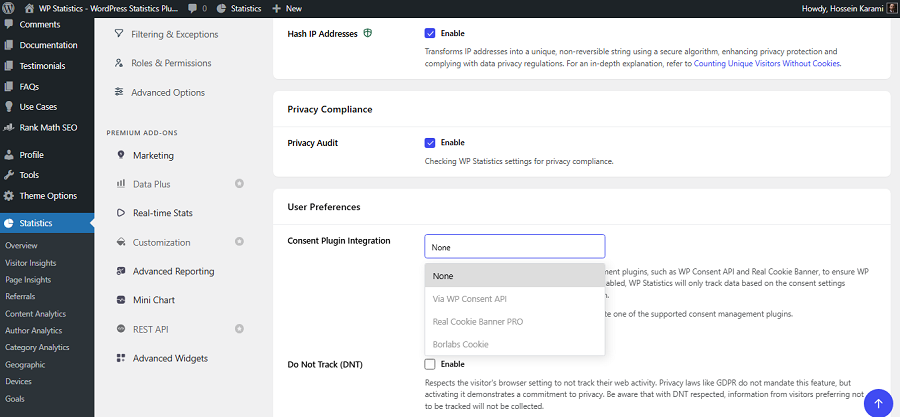
Thanks to innovative tracking methods, some tools can provide accurate analytics data without using invasive techniques.
Here is a summary of the best privacy-focused tools that help you stay compliant while having accurate data:
| Tool | Tracking Method | Privacy Features |
| WP Statistics | First-party, WordPress storage, JavaScript code | Cookieless, IP anonymization, no cross-website tracking |
| Matomo | First-party / self-hosted | Data ownership, privacy controls |
| Plausible | Lightweight script | No cookies, no personal data |
| Fathom Analytics | Lightweight tracking | No cookies, anonymized data |
| Simple Analytics | Lightweight tracking | No cookies, no personal data |
2. Minimize data collection
Collect the information you really need for measuring your business objectives and your site’s performance.
Avoid collecting every possible user attribute because it’s against data protection regulations.
For example, if you only need to know that a visitor completed a form, avoid sending their PII (personally identifiable information) into the analytics platform. This is especially important when you use a tracking tool that might monetize information.
3. Understand consent requirements
Some jurisdictions require consent for data collection or using analytics cookies and tracking technologies.
So, make sure you meet your local regulations to avoid legal issues. Don’t interpret consent requirements as a universal rule for every country.
A consent banner is sometimes necessary, but it’s not enough to respect user choices.
Your tracking configuration must respond appropriately to the user’s decision.
For example, you have to provide an opt-out method so that users can easily cancel their consent.
4. Review data retention
You can only store user-level and event-level information for defined periods. It depends on your local regulations and where your visitors come from.
For example, if you want to collect and retain information of EU residents, you need to comply with data retention rules of GDPR.
Final Thoughts
Website analytics is not just creating an account on GA4 and monitoring numbers. You need to make sure that you’re tracking the right data. If you don’t configure your tracking setup, website, and tag management system, you’ll probably collect the wrong data. To make sure that you’re using an accurate web analytics setup, first install a reliable tool like WP Statistics, GA4, or Matomo. Then, check all the tags, events, UTM links, KPIs, and privacy settings. Test your setup by using your website yourself and view the results. Finally, build a regular audit strategy to make sure your analytics setup stays updated with your site’s changes.
FAQs
What are the best practices for website analytics?
First, define clear goals and KPIs. Then, set up and use a consistent tracking platform and audit your setup regularly. Also, standardize your UTMs across all campaigns.
What are the top 3 website KPIs you track regularly and why?
The three most useful KPIs for many websites are traffic, conversion rate, and ROI. Traffic shows how many visitors you attract, and conversion rate measures how effectively you turn visitors into customers or leads. Also, ROI measures how efficient your investment is.
What are the best tools for website analytics?
Google Analytics, WP Statistics, and Matomo are among the best website analytics platforms.