
How to perform CCPA website analytics?
If your site has visitors and customers from the United States, you must comply with the country’s data protection rules. Otherwise, you might face serious trouble, including heavy fines and reputation damage.
Table of Contents
The CCPA is the most important privacy law in the United States, regulating how you can collect and process residents’ data.
This might be a bit difficult for small business owners and beginners who don’t know what to do to comply with this law, especially when analyzing their metrics.
In this blog post, we’ll explain what CCPA is and how you can make your website analytics CCPA-compliant.
What Is CCPA?
The California Consumer Privacy Act (CCPA) is one of the most significant privacy laws you must consider when working with people’s data in the United States.
It’s a complete framework that determines how your business can collect, use, disclose, retain, and share the personal information of California residents.
The CCPA applies across almost all industries, including healthcare, finance, children, ecommerce, etc,
Its primary purpose is to give consumers visibility into how you process their data and greater control over their personal information.
This is significantly important for website owners because the CCPA fundamentally changes the data collection process.
You have to consider it when you gather information using any method, including analytics platforms, cookies, tracking technologies, customer accounts, and online interactions.
The History of CCPA
Before the CCPA, privacy protections in the United States were confusing. Different industries had to follow different rules, and many times, consumers didn’t know their rights.
The CCPA could solve this problem by establishing a unified and transparent relationship between businesses and consumers.
This law will not prevent your business from collecting data. However, it encourages responsible data manipulation and transparency in practices.
CCPA was created to respect consumer choices and improve the security of personal information.
This law has always been evolving to address new trends and issues. Here is a brief history of how it has changed in recent years:
| Year | Milestone | Why It Matters |
| 2018 | California passes the CCPA | Broad consumer privacy rights |
| 2020 | CCPA becomes enforceable | Legal responsibility for CCPA compliance |
| 2020 | California voters approve the CPRA | Expands and strengthens the original CCPA. |
| 2023 | CPRA takes effect | New rights and obligations |
The CPRA (The California Privacy Rights Act) did not replace the CCPA. Instead, it amended and expanded it by introducing additional consumer rights, clarifying business obligations, and creating a dedicated privacy enforcement agency.
So, when we’re talking about “CCPA compliance,” we usually mean compliance with CCPA as amended by the CPRA.
The Scope of CCPA
The important matter about CCPA is that not all websites should comply with these rules. In fact, this law applies to for-profit businesses that do business in California and meet one of the following thresholds:
- Annual Gross Revenue: More than $26,625,000.
- Data Sales or Sharing: 50% or more of annual revenue comes from selling or sharing consumers’ personal information.
- Data Processing Volume: Buying, selling, sharing, or processing the personal information of 100,000 or more California residents or households in a calendar year.
So, even if your business is not physically located in California but serves California residents and meets these criteria, it is within the law’s scope.
These thresholds have changed over time, particularly after the CPRA amendments. Overall, small organizations might technically fall outside the law’s scope. However, it’s good to stay compliant with these rules because they help you:
- Build consumer trust.
- Prepare for future business growth.
- Simplify compliance with other privacy laws.
- Reduce risk.
- Show responsible data stewardship.
Core Requirements for CCPA-Compliant Web Analytics
Here is what you have to consider for CCPA compliance:
1. Transparency
Transparency is the foundation of CCPA compliance. Consumers should know what information your website collects and how you will use it.
The CCPA law expects your business to communicate your data practices clearly and explain them in simple language that ordinary users can understand.
So, before starting your website analytics, you have to explain that you’re using a tracking technique with clear statements so that visitors understand why you’re tracking their behavior and what data you want to collect. It’s also essential to determine how long you will store the data.
In fact, your privacy policy is the central document that explains your business’s privacy practices.
You need to keep it updated after any changes to your business, especially web analytics like adding a new heatmap tool, marketing pixel, chatbot, customer support widget, or analytics integration.
It’s good to consider a separate section for each of the following practices in your privacy policy:
- Categories of information collected
- Sources of information
- Business purposes
- Categories of recipients
- Consumer rights
- Retention practices
- Contact information
2. Notice at Collection
One of the CCPA’s key principles is that visitors should know about data collection before or at the time you’re collecting data.
This is usually called the Notice at Collection.
As a website owner, you should define a clear notice so that your visitors know what categories of personal information you’re collecting.
You might think that you have mentioned this in the privacy policy, but it’s a bit different. You don’t need to mention every detail in the notice.
Instead, the notice makes users understand what is happening before collection begins. In the notice, you just need to include:
- Categories of information
- Purposes of collection
- Link to the full privacy policy
- Information about privacy rights
3. Data Minimization
One of the most important principles in the CPRA is data minimization. Imagine that you have an analytics tool that is able to collect a wide range of data. This does not mean that you’re allowed to collect all of the data.
You should limit data collection to information that is reasonably necessary for the business purposes you stated. So, it’s a mistake to enable all the available analytics features that your tool offers.
Here are the personal data and identifiers analytics tools usually collect:
- Identifiers: Name, email address, account ID, customer number
- Online identifiers: Cookie IDs, device IDs, advertising IDs
- Internet activity: Browsing history, page visits, click behavior, search activity
- Technical information: IP address, browser type, operating system, device characteristics
- Geolocation: Approximate location derived from IP address
- Commercial information: Purchase history, shopping cart activity
- Network activity: Session information, referral sources, navigation paths
- User-generated content: Form submissions, survey responses, support messages
You have to determine which of these data you need.
4. Purpose Limitation
This is a bit different from data minimization.
You need to clearly define why you want to collect analytics information. Here are some examples of legitimate purposes:
- Measuring website performance
- Detecting technical issues
- Understanding content engagement
- Improving navigation
- Measuring marketing effectiveness
- Preventing fraud
- Monitoring website security
You might think these are obvious purposes, so why do you have to mention them? The problem is when some businesses use data for unrelated purposes without letting visitors know.
For example, a business might combine collected data with customer purchase histories to build advertising audiences for external marketing platforms. This can be a serious CCPA violation and can lead to legal penalties.
5. Respecting Consumer Rights
Your website analytics system should support consumers’ rights in California. In fact, you should know how analytics data fits into broader privacy concepts.
For example, if one of your consumers requests access to personal information, you should know how it works.
Also, deletion requests should be processed by your business legally and safely. Here is a list of the most important consumer rights:
- Right to Know: Identify what analytics data you have collected.
- Right to Delete: Determine if analytics data should be deleted.
- Right to Correct: Consider updating the requirements for account information.
- Right to Opt Out: Stop applicable sharing or selling activities.
- Right to Non-Discrimination: Use services regardless of privacy choices.
6. Opt-Out Requirements
One of the most critical privacy and data protection regulations all over the world is the opt-out rights, especially in California.
If your business sells or shares personal information under California law, your customers have the right to opt out of your data collection system.
This is particularly important when you want to integrate your web analytics platform with advertising ecosystems.
You need to know whether your analytics system only measures website performance or
Use the data for behavioral advertising, audience creation, cross-context tracking, or marketing attribution.
You should carefully consider:
- Advertising integrations
- Cross-site identifiers
- Marketing pixels
- Data sharing arrangements
- Vendor contractual terms
- Audience synchronization features
7. Consent Considerations
Some data protection regulations, like GDPR, insist on prior user consent. CCPA, on the other hand, emphasizes opt-out rights.
However, this does not mean consent is not necessary. You’d better consider a consent banner because:
- You can comply with other privacy laws
- You can use certain cookies under applicable regulations
- You’re able to perform sensitive processing activities
- It’s possible to run multi-jurisdictional websites
- You can gain the trust of consumers
So, if you might have customers outside of California, you’d better think of a consent system.
8. Cookies and Similar Tracking Technologies
Cookies are one of the most important components of website analytics. However, cookies are different in terms of purpose and type of data collection.
The following table helps you understand these differences:
| Cookie Category | Purpose | Analytics Relevance |
| Essential | Website functionality | Unrelated to analytics |
| Preference | Remember user settings | Limited analytics impact |
| Analytics | Measure website usage | Core analytics category |
| Performance | Improve website speed and functionality | Often overlaps with analytics |
| Advertising | Behavioral advertising & audience targeting | Highest compliance scrutiny |
You might also use technologies beyond traditional cookies, including:
- Local storage
- Session storage
- SDKs
- Device identifiers
- Browser fingerprinting
- Server-side identifiers
- API-based tracking
9. Third-Party Analytics
Many businesses use third-party analytics tools because internal analytics platforms might be expensive and resource-intensive.
Third-party solutions often provide advanced capabilities and accurate tracking results. However, many of them use non-compliant methods, so you have to know some details about their data collection process, like:
- The information they transmit
- Data combination across customers
- Identifiers retention
- Advertising features
- The storage place
You need to distinguish between service providers and third parties.
A service provider processes personal information on behalf of a business. They usually work with contractual restrictions to limit how they use information.
On the other hand, a third party generally has greater independence for processing information.
You have to know the difference because it affects compliance requirements and your privacy policy.
10. Data Retention
CCPA doesn’t allow you to store analytics information indefinitely. You should define retention periods that align with your business purposes.
Here are the factors that impact the retention period:
- Reporting needs
- Security investigations
- Fraud detection
- Customer support
- Regulatory obligations
- Operational requirements
11. Data Security
When you collect and store people’s data, you’re responsible for its security.
You should consider security during the data lifecycle, from collection and transmission to storage and deletion.
You have to take suitable measures to ensure data security. Here are some common strategies:
- Encryption during transmission
- Encryption at rest, where appropriate
- Access controls
- Multi-factor authentication
- Role-based permissions
- Logging and monitoring
- Secure vendor management
- Incident response planning
Try to regularly review your system security and update tools to prevent any data leaks.
12. Recordkeeping and Accountability
You need to keep a record of every compliance activity to be able to provide it as proof.
Here is a summary of what you need to record:
| Record | Purpose |
| Data inventories | Identify collected information |
| Processing purposes | Explain why information is collected |
| Vendor assessments | Evaluate analytics providers |
| Retention schedules | Document storage periods |
| Consumer request logs | Demonstrate compliance activities |
| Privacy policy revisions | Track disclosure updates |
| Employee training records | Show organizational awareness |
| Internal audits | Support ongoing compliance improvements |
Tips for Making Your Site Compliant with CCPA
Until now, you’ve learned about CCPA’s importance and requirements. But how can you make your site compliant? Here are the best practices for CCPA compliance:
- Create a Data Inventory: Understand what personal information your web analytics tool collects, where it comes from, how it is used, and who has access to it.
- Choose a CCPA-Compliant Tool: Install a GA4-alternative tool like WP Statistics. It’s compliant with GDPR and CCPA by default. WP Statistics doesn’t use cookies and avoids profiling users or tracking them across websites.
- Minimize Data Collection: Only collect the information you need to analyze your site’s performance.
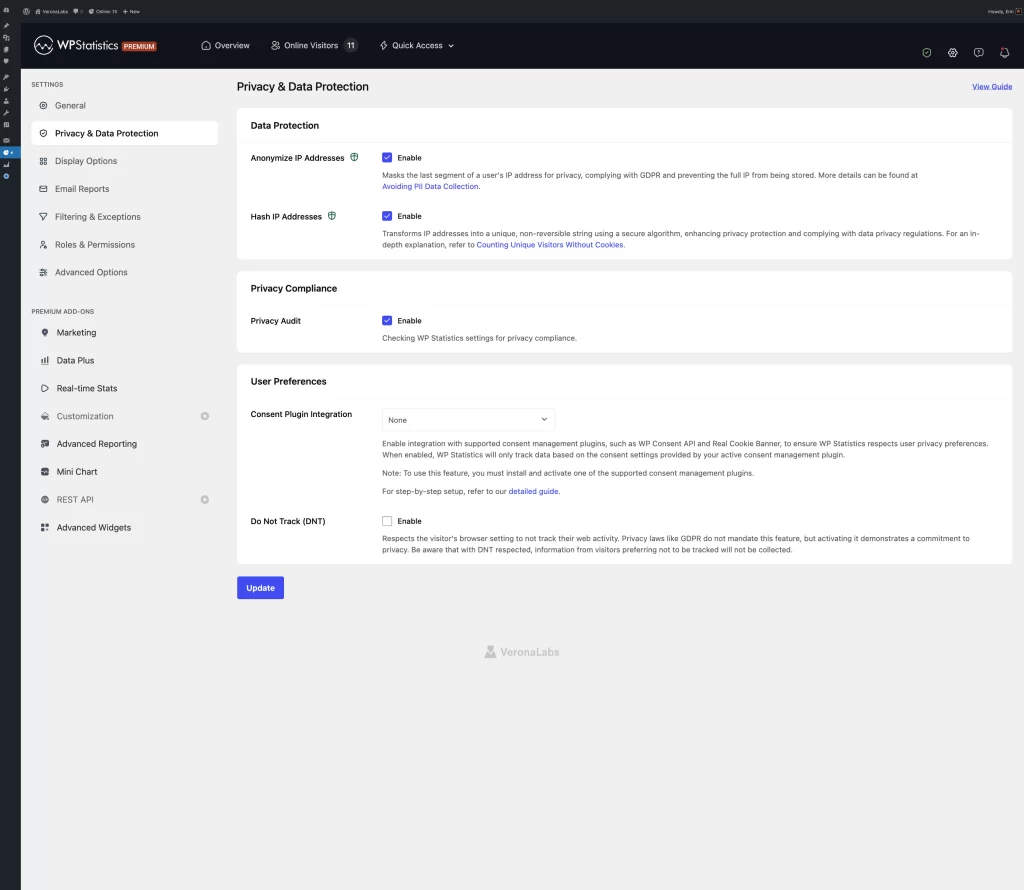
- Configure Privacy Settings: Enable privacy-focused features such as IP anonymization on your web analytics tool.
- Use Aggregated Data: Instead of using cookies, go for aggregated or anonymized reports.
- Limit User Identifiers: Reduce the use of persistent identifiers, such as advertising IDs or permanent user IDs.
- Set Data Retention Policies: Define retention periods and delete analytics data or anonymize it when you no longer need it.
- Perform Regular Compliance Audits: Check your web analytics system on every occasion to make sure everything is in accordance with CCPA requirements.
What Happens if You Don’t Comply with CCPA
Here is a list of penalties you might face if you don’t comply with CCPA requirements:
| Type of Consequence | Summary | Potential Impact |
| Regulatory Investigations | Authorities may investigate suspected violations. | Audits, corrective actions, and compliance reviews. |
| Civil Penalties | You may be fined for CCPA violations. | Up to $2,500 per unintentional violation and $7,500 per intentional violation. |
| Private Lawsuits | Consumers may sue following certain data breaches. | Legal fees, settlements, and class action lawsuits. |
| Data Breach Liability | Weak security may increase legal exposure. | Remediation costs and potential damages. |
| Business Disruption | Compliance investigations require time and resources. | Operational delays and higher compliance costs. |
| Reputational Damage | Privacy violations can harm a company’s reputation. | Loss of customer trust and negative publicity. |
| Loss of Consumer Confidence | Poor privacy practices may drive customers away. | Reduced loyalty and lower revenue. |
CCPA vs. Other Data Protection Regulations
Here are the differences between CCPA and some of the most important privacy rules:
CCPA vs. GDPR
The General Data Protection Regulation (GDPR) determines personal data processing laws in the European Union.
This is one of the world’s most comprehensive privacy laws. Here are the differences between CCPA and GDPR:
| Feature | CCPA | GDPR |
| Applies to | California residents | Individuals in the European Union |
| Primary focus | Consumer privacy rights | Comprehensive data protection |
| Consent model | Primarily opt-out for sale/share | Often requires opt-in consent |
| Right to access | Yes | Yes |
| Right to delete | Yes | Yes |
| Right to correct | Yes | Yes |
| Data portability | Yes | Yes |
| Sensitive data protections | Enhanced under CPRA | Extensive protections |
| Penalties | Per violation | Percentage of global annual revenue |
CCPA vs. VCDPA
The Virginia Consumer Data Protection Act is Virginia’s privacy law and has several similarities with the CCPA, but differs in important areas:
| Feature | CCPA | VCDPA |
| Geographic scope | California | Virginia |
| Consumer rights | Broad | Broad |
| Opt-out rights | Yes | Yes |
| Sensitive data | Additional protections | Requires consent for certain processing |
| Enforcement | State regulators | Virginia Attorney General |
CCPA vs. CPA
The Colorado Privacy Act is Colorado’s privacy law that includes requirements similar to the CCPA. It has additional obligations for businesses that work with high-risk data processing.
Both laws emphasize:
- Consumer transparency.
- Access rights.
- Deletion rights.
- Data minimization.
- Reasonable security measures.
Conclusion
Website analytics is not just about checking traffic. You have to be careful about data collection and storage processes and make sure about the privacy and security of your site’s visitors.
Data protection and privacy rules are different in various regions, so you might have to consider several regulations if you’re running an international site.
For California residents, you have to comply with CCPA, which insists on privacy, transparency, and security.
You need to minimize data collection and let visitors know what type of data and for what reason you’re collecting.
The most important practice to keep your web analytics compliant with CCPA is to choose a reliable tool like WP Statistics.
It’s compliant by default so that you can track your site’s performance accurately without violating CCPA or other privacy laws. If you need more information, you can contact us right now!
FAQs
Is Google Analytics CCPA-compliant?
Yes. GA4 can be CCPA-compliant if you properly configure it. You have to disclose it in your privacy policy and use it in a way that respects consumer rights, including applicable opt-out requests.
What does CCPA-compliant mean?
It means you follow the California Consumer Privacy Act. In fact, you have to be transparent about data collection, protect personal information, and respect consumers’ privacy rights.
What is the best CCPA-compliant website analytics tool?
You can use WP Statistics if you have a WordPress website.
Does CCPA enforce cookie banners?
No! Unlike GDPR, CCPA does not enforce opt-in consent.