
Nonprofit organizations need all the conventional channels a business needs to spread the word. Of course, when you use a channel like a website, a social platform, or events, you need to measure its performance.
Table of Contents
Although you don’t want to earn money from your website, you need to know its strengths and weaknesses to improve its content reach and donation rate.
That’s why you need a web analytics tool to monitor your nonprofit site’s traffic, visitor behavior, and goal completion.
Your site’s purpose is different from commercial sites, but all the tracking capabilities you need are identical. Moreover, you need to pay more attention to the confidentiality of users because many people don’t want to disclose their donation activities.
So, website analytics for nonprofits can be a bit challenging. But don’t worry!
This blog post explains how to measure your nonprofit site’s performance while respecting supporters’ privacy.
Why Nonprofit Websites Need Analytics
You might wonder why nonprofit organizations use website analytics when they don’t want to market any product/service.
Here are the benefits of web analytics for nonprofits:
1. Understand Your Website Audience
Analytics shows who visits your website and what they like. Although you might already know what type of people like your site’s content, you can’t be sure about their behavioral details.
Web analytics helps you understand:
- The location of visitors
- The devices visitors use
- The content users like the most
These insights help you optimize your website so that it better matches your supporters’ needs.
2. Make Better Marketing Decisions
Web analytics data is the best source to figure out which channel your audience is most active on.
Using analytics data, you can segment channels into organic search, social media, email, referrals, or paid campaigns.
This helps you focus your limited marketing budget and time on channels that work better.
3. Increase Online Donations
Analytics can show you how visitors interact with your donation journey and where they leave it. Using this data, you can improve your donation pages, CTAs, and user experience to reach higher donations.
4. Measure Campaign Performance
As a nonprofit organization, you might run fundraising campaigns, awareness events, or advocacy initiatives. Analytics helps you measure their real impact and see which campaigns attract visitors, generate engagement, and lead to meaningful actions.
5. Identify Engaging Contents
Not every article can make visitors interact with your organization. Content analytics helps you identify the articles, landing pages, resources, and other content that attract visitors and encourage them to take action.
Key Metrics for Nonprofit Website Analytics
Here is a summary of the most important KPIs you need to measure the performance of your nonprofit website:
| Metric Category | What It Tells You | Why It Matters |
| Audience & Traffic | Who visits and how much traffic you receive | Understand reach |
| Acquisition & Marketing | Where visitors come from | Evaluate marketing |
| Engagement | What visitors do on the site | Understand content effectiveness |
| Conversion & Supporter | Whether visitors take meaningful actions | Measure outcomes |
| Campaign & Fundraising | How campaigns generate results | Improve fundraising |
| Website Performance | Whether the site works efficiently | Reduce friction |
| Privacy & Data Quality | Whether your data is responsible and reliable | Protect users and decisions |
Let’s discuss them in more detail:
Audience & Traffic Metrics
The most common details a website owner wants to know are the number of visits and visitors.
Website analytics gives you insights into your visitors’ demographics to help you know them better:
1. Users
Users are the number of people who visit your site during the tracking period. It shows the real size of your audience and brand awareness.
Tracking users over time helps you understand overall reach and identify trends. For example, an increase in the number of users means that your website reach has improved.
2. New vs. Returning Users
You should know what percentage of your users are new audiences. A large percentage of new users shows successful outreach, SEO, advertising, or campaign activity.
Returning users show continuing interest. This is particularly important for organizations publishing ongoing resources, running advocacy campaigns, or communicating frequently with supporters.
You should be careful when interpreting this metric. None of them is good alone. You have to consider the context and also other metrics like conversion rate when comparing new vs. returning users.
3. Sessions and Engaged Sessions
A session (also known as a visit) is a period of activity on your website. Sessions can help you understand the volume of visits by users. Usually, the more sessions per user, the better, but it’s essential to focus on engaged sessions.
Engaged sessions are visits with meaningful interactions like clicking, reading, scrolling, watching videos, etc.
However, you can’t interpret an engaged session as proof of user satisfaction.
Sometimes, visitors spend several minutes on a page because they can’t find what they need.
On the other hand, someone can quickly find the phone number they need and leave the site.
4. Geographic Location
Website analytics tools can show where your site’s visitors are located. This helps you know where you can create communities and hold events to reach better results.
For example, if you’re running a food bank, you can understand where most visitors come from and align your campaigns and events better.
5. Device Type
You should compare traffic and user behavior on different devices: mobile, desktop, and tablet.
This shows you what devices the majority of your users use and helps you improve your website design accordingly.
For example, if the majority of donations come from mobile devices, you need to pay special attention to mobile-friendliness.
6. Landing Pages
As you know, the first impression is really important, and that’s why you need landing page analytics.
A landing page is the page where a visitor enters your website. In landing-page analysis, you connect conversions with first impressions and can understand which page leads to more conversions.
Landing-page analysis determines:
- Pages that attract the most visitors
- Acquisition channels that send visitors to landing pages
- Engagement rates of landing pages
- Mobile vs. desktop performance
Remember that sometimes a landing page with the highest visits is not the best landing page. For example, a blog post might receive huge traffic, but it doesn’t result in a donation.
Acquisition & Marketing Metrics
We discussed the amount of traffic you receive, but we didn’t talk about the channels and campaigns that drive the traffic. In this section, we’ll introduce the metrics that help you recognize your best donor acquisition channels:
7. Organic Search
Organic search traffic comes from unpaid search results. This is the most important source of traffic because you don’t pay for it.
When donors are looking for:
- Services
- Educational information
- Local resources
- Causes
- Volunteer opportunities
- Ways to donate
- Advocacy information
they find your links and open landing pages.
Fortunately, Google Search Console offers a complete set of features for tracking organic search traffic.
This helps you see what keywords are bringing more traffic to your site and what pages attract donors.
8. Referrals
Referral traffic comes from the links you put on other websites, like partners, news organizations, universities, government agencies, community organizations, and industry publications.
That’s why referrals usually show highly relevant and engaged audiences. So, try to improve your referral traffic by building partnerships with relevant sites and optimizing your off-site SEO strategies.
9. Social Media Signals
You must be active on relevant social platforms and monitor their traffic to measure the performance of your campaigns.
10. Email Marketing
Email is still one of the most effective channels for donation requests. You have to measure the traffic coming from email campaigns and also their conversion rate compared to other channels.
You can use UTM links in your campaigns to distinguish sources and campaigns to find the best-performing ones.
Engagement Metrics
Pageviews and visitors are just numbers. You need to know how engaged your users are and what makes them interact more.
Engagement metrics help you understand whether your content keeps your visitors engaged:
11. Engagement Rate
Engagement rate is the most important engagement metric. It can help you understand what percentage of your site’s sessions have meaningful interactions.
You have to use it to compare your campaigns, landing pages, and traffic channels. Although you want to increase engagement, you can’t simply consider every high engagement rate a good signal.
You can’t assume that a certain engagement rate is good because the appropriate level depends heavily on your page purpose and context.
Here is a good benchmark for engagement rates in different industries:
| Industry | Typical Engagement Rate |
| B2B / SaaS | 55–70% |
| Technology | 55–70% |
| Healthcare | 60–75% |
| Education | 60–75% |
| Financial Services | 55–70% |
| E-commerce | 55–70% |
| Travel & Hospitality | 60–75% |
| Real Estate | 55–70% |
| Media & Publishing | 65–80% |
| Nonprofit | 55–70% |
| Professional Services | 55–70% |
| Automotive | 55–70% |
12. Average Engagement Time
Average engagement time helps you find pages that hold attention, but you should be careful when interpreting it.
A longer average engagement time is not necessarily a positive signal. Sometimes it might show frustration and the fact that the user can’t find the required information or do the desired action.
So, you need to use this metric alongside other signals, like volunteer conversion and entry/exit rates.
13. Downloads
Downloads can be important for nonprofit websites. Your site might have important documents like:
- Annual reports
- Research
- Guides
- Policy documents
- Educational materials
- Program resources
- Grant information
- Toolkits
You need to specifically track downloads to see what type of resources your donors like.
14. Internal Search
You’d better use an internal search feature for your website so that your visitors explore other aspects of your nonprofit institution.
Then, you can track search terms to know what topics visitors want to read about. Search terms show that visitors cannot easily find those topics through your website’s navigation.
On the other hand, repeated searches for certain keywords, like “Volunteer” and “food assistance near me”, show strong demand.
Try to compare internal search terms with top search engine queries to understand what users can find through SERPs and what can’t.
Conversion & Supporter Metrics
Here are the most important conversion metrics you can follow to assess your site’s performance:
| Conversion | Example | Importance |
| Donation | Completed donation | High |
| Donation start | Donor begins checkout | High |
| Volunteer signup | Application submitted | High |
| Email signup | Newsletter subscription | Medium/High |
| Event registration | Registration completed | High |
| Resource download | Guide downloaded | Medium |
| Contact form | Inquiry submitted | High |
| Advocacy action | Petition submitted | High |
| Phone click | Click-to-call | Depends on mission |
As a nonprofit website owner, you don’t need to track all of these conversion rates. You can choose the ones that are more connected to your actual goals.
Campaign & Fundraising Metrics
If you’re running campaigns to fundraise, you can track these metrics to understand if they’re successful:
15. Donation Completion Rate
The percentage of people who start the donation process and successfully complete it. For example, if 2,000 people start donating but only 500 finish, the completion rate is 25%.
A low rate might be due to payment issues, long forms, or a poor mobile experience.
16. Average Donation Value
Apart from the number of donors, you need to measure the average amount each donor pays.
You can calculate it by dividing total donation revenue by the number of completed donations. For example, $30,000 from 600 donations equals an average gift of $50.
Also, you need to use website analytics tools to understand visitor behavior to find patterns that lead to more donations.
Website Performance Metrics
Your site should load quickly. Otherwise, donors might get annoyed and go to another nonprofit website.
The following technical metrics are among the most important website analytics metrics for nonprofits:
17. Core Web Vitals
Core Web Vitals focus on three aspects of user experience:
- Largest Contentful Paint (LCP): loading performance
- Interaction to Next Paint (INP): responsiveness
- Cumulative Layout Shift (CLS): visual stability
Generally, it’s good to consider these benchmarks for these metrics:
- LCP < 2.5 seconds
- INP < 200 milliseconds
- CLS < 0.1
Fortunately, these metrics are available on Google Search Console or PageSpeed Insights. So, you can check them yourself without technical expertise.
18. Form Errors
Forms play a critical role in nonprofit and donation-based websites. So, form errors deserve your special attention because they can lead to lower conversion rates and visitor frustrations.
For example, if you have a contact form with 2,000 views and 20 submissions, you need to check it to make sure there is no technical issue.
You need to track everything like:
- Form starts
- Form completions
- Validation errors
- Submission errors
- Abandonment
- Confirmation-page visits
19. Broken Links and 404 Errors
Broken links create friction and also dent donors’ trust. You need to monitor important pages for:
- 404 errors
- Broken internal links
- Missing downloads
- Incorrect redirects
- Expired campaign pages
- Broken external integrations
Privacy & Security
Last but not least, you have to pay special attention to the security of your visitors’ data and privacy concerns.
Consider the following factors when monitoring your website:
20. Consent & Privacy Compliance
Many donors don’t like to make their activities public. So, you have to make sure that their personal information is stored safely and handled without third-party access.
Try to review your site’s consent settings, cookie usage, data retention, access controls, and data-sharing practices.
Moreover, manage opt-out requests and respect visitors’ choices to gain trust and comply with privacy and data protection rules like GDPR.
21. Tracking Accuracy
On every occasion, measure whether you’re reliably recording important events, such as donations and form submissions.
You have to watch for missing or duplicate events, double-counted conversions, and discrepancies between analytics and your donation platform.
Best Tools for Tracking Nonprofit Websites’ Performance
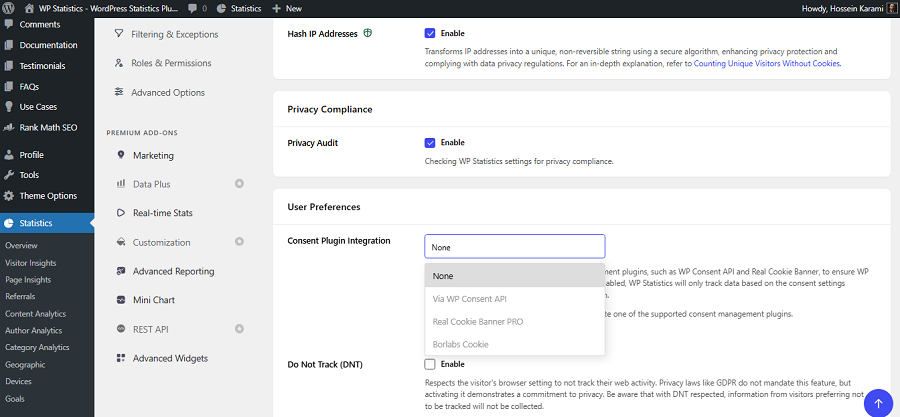
Nonprofit websites are a bit different from normal commercial sites. So, you can’t use any tracking tools they use.
You need to consider privacy and data protection when choosing analytics tools. Look at the following website analytics tools and choose the one that fits your requirements:
| Tool | Best For | Nonprofit Key Features | Key Metrics | Pricing |
| WP Statistics | WordPress sites | Privacy-friendly | Visitors, Views, Referrers | Free/paid |
| Matomo | Privacy analytics | Goal tracking | Visits, Goals, Events | Free/Paid |
| Google Analytics | Advanced analytics | Campaign tracking | Users, Events, Conversions | Free |
| Plausible | Simple analytics | Privacy-focused | Visitors, Pages, Goals | Paid |
| Microsoft Clarity | User behavior | Session insights | Heatmaps, Sessions, Scrolls | Free |
| Fathom Analytics | Lightweight analytics | Privacy-first | Visitors, Pages, Goals | Paid |
Final Thoughts
You might suppose that tracking a nonprofit website is not different from monitoring a commercial site. However, there are some important differences that make you plan a specific analytics strategy for it. For example, you have to pay special attention to privacy and compliance with data protection rules. You can’t simply store and share donors’ personal information. So, your analytics tools should also be different from a typical ecommerce website. We reviewed the most important points about website analytics for nonprofits. If you need more help, you can contact us.
FAQs
What privacy metrics should nonprofits monitor?
Track consent status, data retention, access permissions, and the accuracy of data collection. These help ensure analytics is both responsible and reliable.
Can nonprofits use Google Analytics without collecting personal information?
Yes. Nonprofits can track aggregated website activity and events without sending names, email addresses, or other personally identifiable information to Google Analytics.
Do nonprofits need consent to use analytics cookies?
It depends on the applicable privacy laws, the technologies used, and how data is processed. In some countries, analytics cookies require consent.
How can nonprofits improve analytics data quality?
Test important events, check for duplicate or missing conversions, review campaign tracking, and compare analytics data with donation and CRM records.
What personal information should nonprofits avoid collecting in analytics?
Avoid sending names, email addresses, phone numbers, donation notes, and sensitive form responses to analytics tools. Keep this information in appropriate, secure systems.