
Web analytics is not just tracking the number of views. You have to measure the engagement of visitors with your webpages and make sure about good user experience.
Table of Contents
There are some metrics to measure user interactions on your webpages, including bounce rate. It’s a sign of user interest in your page, so you have to keep track of it.
The thing is that many website owners might interpret bounce rate in the wrong way. In this blog post, we’ll explain what bounce rate is and how to track bounce rate in WordPress.
What is Bounce Rate in Web Analytics?
Bounce rate is the percentage of visitors who land on your webpage and leave without doing anything.
In fact, when someone visits one of your pages and exits without clicking a link, submitting a form, or scrolling deeper, a “bounce” happens.
For example, a user finds your homepage in SERPs and immediately leaves it after opening it.
Here is how bounce rate is calculated:
Bounce Rate = (Single-Page Sessions / Total Sessions)×100
So if 1,000 people visit your website and 600 leave without interacting further, your bounce rate would be 60%.
Although there are many advanced engagement tracking metrics, bounce rate is still a valuable metric for understanding your user behavior.
Bounce rate helps you understand how effectively your content attracts visitors’ attention. Using this metric, you can detect some problems in your content, navigation, linking, and layout design.
What Does Bounce Rate Mean?
Bounce rate is about user experience on your web pages, but the problem is how to interpret the result. Website owners usually think that the bounce rate should not be high. Let’s compare high vs. low bounce rate to see if this thought is correct:
High Bounce Rate
A high bounce rate can sometimes be a signal of friction, or when the majority of visitors don’t see what they expected.
Here are some common reasons for a high bounce rate:
- Slow Speed: Visitors don’t like to wait for a long time. Slow website speed can increase bounce rate.
- Mobile Experience: More than 50% of global website traffic comes from mobile devices. So, a poor mobile experience can lead to losing the majority of your visitors.
- Misleading Headlines: When a visitor comes to your page and sees different headlines from what he/she expected, they might lose interest and leave your site.
- Weak Content Quality: You have to answer visitors’ questions. If you don’t cover the subject and write a weak text, the bounce rate will increase.
- Distractive Popups: If you have too many ads and pop-ups on your landing pages, you can expect a high bounce rate.
- Lack of Internal Links: Suitable internal links encourage visitors to open other pages on your site. Without them, visitors leave your site without reading other content.
- Unclear Calls-to-Action: CTAs play an important role in keeping visitors on your site. Make them compelling and try to create a sense of FOMO to encourage visitors to click.
The important matter in bounce rate interpretation is that a high bounce rate is not necessarily a bad thing.
Note that some pages have a single purpose and must answer a single question quickly. So, if a visitor comes to these pages and finds his/her answer, they will leave quickly. This is not a bad user experience.
For example, the following pages don’t require spending time:
- Contact pages
- Dictionary definitions
- Simple tutorials
- Recipe pages
- News articles
- Blog posts answering one specific query
So, users might find what they need quickly and leave your site satisfied. That’s why you should be careful when interpreting bounce rates on your site.
Low Bounce Rate
A lower bounce rate often means a higher engagement rate. When visitors stay on your site and visit other pages, they’re showing various types of interactions like:
- Reading multiple pages
- Clicking internal links
- Watching videos
- Exploring products
- Subscribing to newsletters
- Interacting with your content
Overall, a low bounce rate is a sign of a healthy user experience and strong engagement.
Average Bounce Rates by Website Type
There is no rule to set a benchmark for bounce rate. It might vary by website type and industry. Take a look at the following table to compare the average bounce rate in different sites:
| Website Type | Average Bounce Rate |
| Blogs | 65% – 90% |
| Ecommerce Sites | 20% – 45% |
| Landing Pages | 60% – 90% |
| News Websites | 60% – 80% |
| Service Business Websites | 30% – 55% |
Try to consider these benchmarks and compare your site with them to see if you’re doing well.
Also, you should never interpret bounce rate without considering other metrics. It’s good to monitor related metrics, like
- Session duration
- Engagement rate
- Pages per session
- Scroll depth
- Conversion rate
These help you understand the true reason for the low or high bounce rate. Then, you can decide based on a correct interpretation.
The following table helps you interpret these together:
| Bounce Rate | Session Duration | Pages per Session | Scroll Depth | Interpretation |
| High | High | 1 page | High | Content fully read |
| High | Low | 1 page | Low | Visitors leave quickly |
| Low | Low | Multiple pages | Low to medium | Weak content experience |
| Low | High | Multiple pages | High | Excellent engagement |
| High | Medium | 1 page | Medium | Normal behavior |
| Low | High | Many pages | Medium to high | Great user experience |
How to Track Bounce Rate in WordPress?
Now that you know what bounce rate is and why it matters, it’s time to learn how to track it for your website.
Some web analytics tools offer a feature to track bounce rate, but some others require you to calculate it manually based on single sessions on your site.
Here is how:
1. Use WordPress Web Analytics Plugins to Monitor Bounce Rate
WordPress analytics plugins let you track many metrics, including bounce rate, directly on your dashboard. So, you don’t need to leave your website to check your stats.
Here are some of the best WordPress analytics plugins that allow you to track bounce rate:
- WP Statistics
- ExactMetrics
- MonsterInsights
WP Statistics is one of the best Google Analytics alternatives that offers privacy-focused services without reducing the accuracy.
Here is a step-by-step guide to tracking bounce rate using WP Statistics:
Step 1: Install WP Statistics
Go to your WordPress dashboard and find Plugins in the left side menu. After clicking it, you have to choose Add Plugin.
Now, you’ll see an address bar to search for plugins. Enter “WP Statistics” to find it and click Install. After that, click Activate.
Step 2: Check Visitor Insights
Go to Statistics and click Visitor Insights. Here you can see the behavior of visitors, including total views.
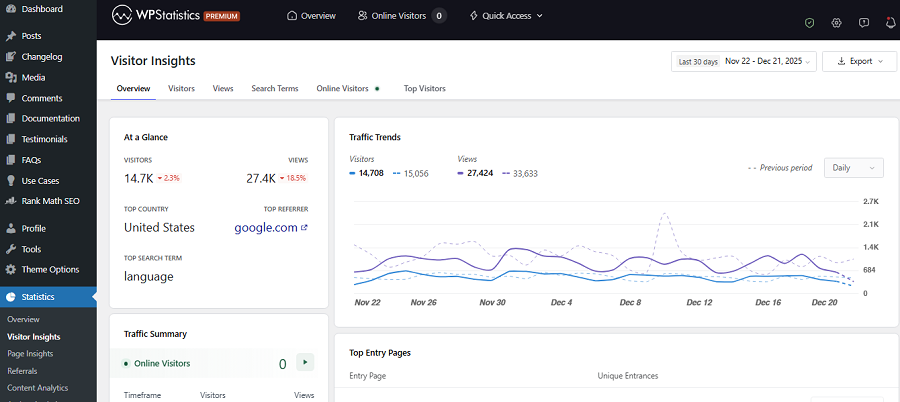
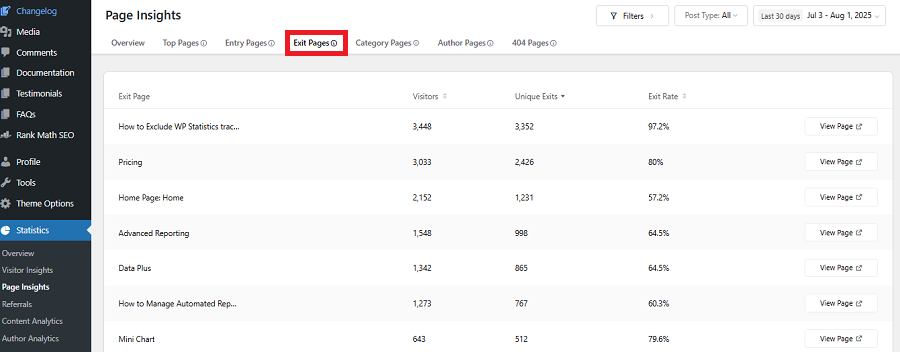
Visitors who have just 1 view make a bounce. You can also check the Entry and Exit page for these visitors to see which pages create more bounces.
Step 3: Enable Advanced Reporting Add-on
To calculate the bounce rate, you have to count the number of times a page appears as an Entry and Exit page with a total of 1 under Visitors Insights.
The thing is, you can’t manually do that. You have to export the data to a sheet to make the calculation easier.
So, go to Settings and click Advanced Reporting. Now, make the payment to enable the feature.
Step 4: Export Data
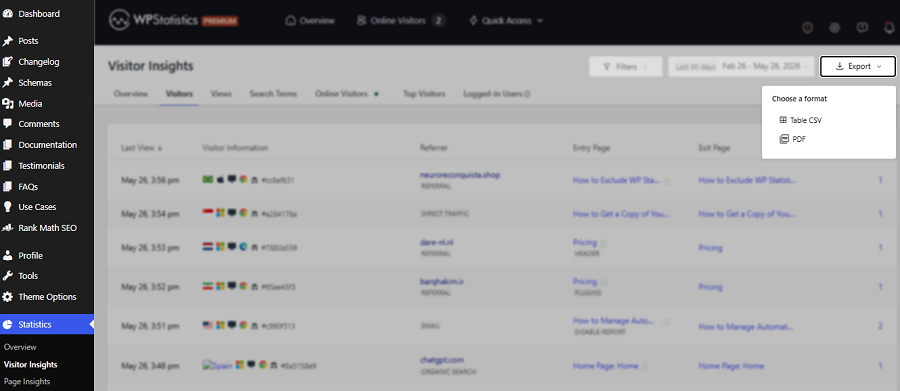
Go back to Visitor Insights and find the Export option in the top right corner. You have two options to save data: Table CSV and PDF.
Step 5: Calculate Bounce Rate
In the sheet, separate items with a Total Views of 1. These are single/session pages. Then, divide it by the total number of visitors.
This might be a bit different from the result of advanced tools like GA4 because they consider non-engaged visitors.
2. Use GA4 to Track Your Site’s Bounce Rate
Here is a more accurate method to track your site’s bounce rate. Go to the Google Analytics website and create an account. Add your site as a property and follow the steps below:
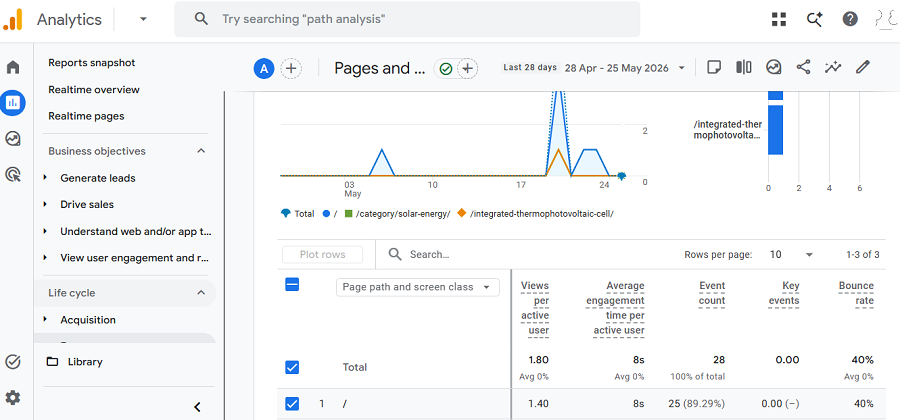
- Go to Reports
- Click Engagement under Life Cycle
- Click Pages and Screens
- In the top right corner, click Customize
- Click Metrics and find Bounce Rate
- Tap Save and get back to Pages and screens
Now, you can see the bounce rate in the last column of the page results.
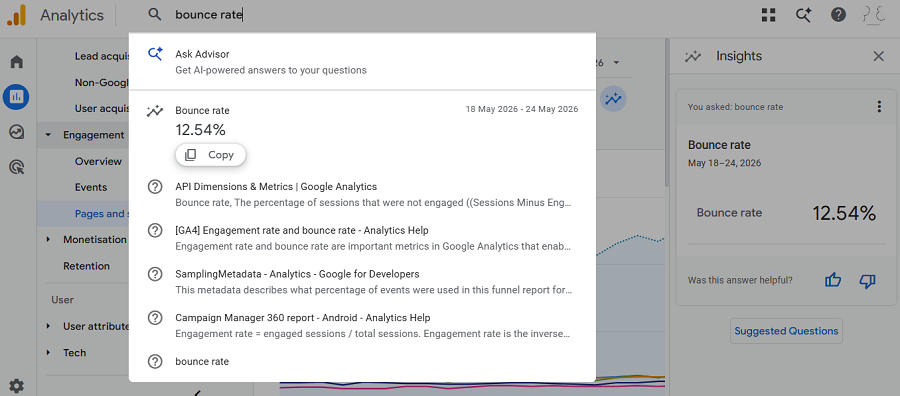
You can also search for bounce rate in the search tab to see the result:
Tips to Improve User Experience Using Bounce Rate
You can use bounce rate to find issues with user experience on your webpages and optimize your site accordingly. Here are some tips to do that:
1. Improve Page Speed
Speed has a direct impact on engagement and bounce rate. If your website takes too long to load, visitors will leave before reading anything. You can see the result when tracking the bounce rate.
So, think of anything that causes speed issues, like:
- Heavy images
- Too many plugins
- Poor hosting
- Unoptimized themes
- Excessive scripts
2 Match Search Intent
One of the most important reasons for high bounce rates is content mismatch. If users open a page and see something different from what they expected, they will likely leave immediately.
3. Improve Readability
You should not solely think of SEO factors when writing a blog. Readability will greatly impact bounce rate.
Try to consider readers’ interests when writing your blog. For example, include these readability factors:
- Short paragraphs
- Clear headings
- Bullet points where appropriate
- White space
- Simple language
These factors encourage readers to scroll more and spend more time on your page.
4. Use Internal Linking
Internal links guide users to pages on your website and prevent visitors from reaching a dead end.
For example, if you link to related posts at the end of an article about bounce rate, visitors will probably click and stay longer on your website.
5. Optimize for Mobile Devices
Even if your website looks great on desktop but breaks on mobile, you can’t expect a good user experience.
This will significantly increase the bounce rate and also damage your brand.
Try to check:
- Font sizes
- Button spacing
- Navigation menus
- Image responsiveness
- Mobile page speed
6. Improve UX & Navigation
You should design your page and navigation so that visitors quickly understand where to go next.
Avoid confusing layouts because they increase frustration and lead to a high bounce rate.
7. Add Engaging Visuals
Visualization greatly influences visitors, especially if you have a non-expert audience. Images, charts, screenshots, and videos will improve engagement and increase time on page.
8. Use Clear Calls-to-Action
Visitors need direction, so you have to clearly say what to do next. Try to consider compelling CTAs to encourage users to read another article, subscribe, or anything else. Try to be friendly, not pushy, because they might leave your site without any interaction.
Conclusion
Bounce rate is an important web analytics metric that shows some critical issues on your website.
You have to be careful when tracking and interpreting the bounce rate because it can be misleading.
A high bounce rate is usually considered to be a bad signal. However, sometimes, it’s just the nature of your content. Google doesn’t consider it a direct ranking factor, but it’s still an important factor in SEO.
Various web analytics platforms might show bounce rate differently. Try to use GA4 to track bounce rate.
You can also use plugins like WP Statistics to monitor visitors with a single page view. If you need more information about bounce rate tracking, you can contact our support.
FAQs
What is a good bounce rate?
You need to consider the average bounce rate by industry. For example, for blogs, a bounce rate of 70% is OK. However, for ecommerce websites, a bounce rate higher than 40% is considered bad.
Is a 70% bounce rate good?
It depends on your niche. If you have an online shop, it’s not good at all.
Are bounce rate and SEO related?
Yes! Bounce rate will greatly impact SEO. Although bounce rate is not a direct ranking factor, it shows an issue, such as a slow page or mismatched content. So, you have to think of a way for it.