
If you’re running Ad campaigns for your business without an effective tracking platform, you’re probably wasting your money.
In fact, when you don’t measure the effectiveness of your Ad campaigns, you can’t understand what’s working and what’s not.
Some small business owners don’t track their campaigns well due to the difficulty of setting up a tracking dashboard on third-party tools.
Thanks to web analytics plugins on WordPress, you can now have the accuracy of GA4 inside your website’s dashboard.
So, even if you’re a non-expert, you can easily run Ads for your site and analyze the results.
Here at WP Statistics, we’ll help you learn how to track and compare Ad campaigns inside your WordPress dashboard.
Types of Ad Campaigns to Track inside WordPress
Before introducing web analytics tools for tracking Ads, it’s good to learn what type of campaigns you can run for your WordPress site.
Not all ad campaigns behave the same. Tracking requirements vary depending on traffic source, intent, and conversion type.
1. Search Ads
You have two options to get your product pages to the top of SERPs:
- Organic search by using effective SEO strategies
- Paid search by using search Ads like Google Ads and Bing Ads
Search ads are the best method to capture high-intent users who are looking for products/services to purchase.
So, you have to use an effective tracking platform to see if your search Ads strategy is working well.
2. Social Media Ads
Social media has changed the way businesses advertise and sell their products and services.
If you don’t use a suitable tracking platform, you can’t understand which social platforms are better to reach out to your audience.
You need to track and compare Ad campaigns and find the social platform that drives more traffic to your WordPress website.
3. Display & Retargeting Ads
Display ads are banner ads you can place on websites, blogs, or apps. Some analytics tools use users’ behavior on the internet to retarget them and display relevant Ads on the websites they visit.
For example, if a user searches for “WordPress analytics plugins”. After that, if the same user opens blogs or news websites, they will see relevant Display Ads for WordPress plugins.
Tracking these behaviors might be against data protection regulations, like GDPR. If you use these tools, you need to use cookie banners on your site and inform users of the data you’re collecting.
4. Native & Sponsored Content Ads
You can collaborate with niche websites to exchange content or publish guest/sponsored content.
These techniques can drive traffic to your website and improve your backlink profile. You have to track these content Ads to see what’s working well.
5. Affiliate & Partner Campaigns
You can partner with other WordPress websites and try to promote together. Of course, you have to measure the effectiveness of each partner to refine your future partnership.
You have to use a tracking platform to analyze:
- Referral tracking
- Unique campaign parameters
- Conversion validation
- Revenue per source tracking
6. Email Campaigns
Last but not least, you can leverage email ads for lead generation and driving traffic to your website. Your tracking platform should be able to segment traffic sources, including emails.
Here is a quick comparison between different Ad campaigns you have to track on your WordPress website:
| Campaign Type | Goal | Track | Compare |
| Search Ads | Get sales | Keywords, conversions | Cost per sale |
| Social Ads | Drive actions | Clicks, events, purchases | ROAS |
| Display Ads | Build awareness | Ad views, return visits | Return conversions |
| Native Ads | Build trust | Scroll, time on page | Avg. time |
| Affiliate | Partner sales | Referrals, revenue | Revenue per partner |
| Email-Driven | Nurture leads | Subscriber source, purchases | Lifetime value |
Common Ad Campaign Analytics Approaches
There are several ways to handle campaign analytics that WordPress site owners rely on. Each has strengths and weaknesses.
1. UTM Tracking
This is one of the best Ad campaign tracing methods and was first introduced by Urchin Software Corporation.
You just need to add some tags to your campaigns’ links to make them trackable for analytics tools.
UTM parameters or URL tags can determine:
- Source
- Medium
- Campaign
- Content
- Term
Here is a sample UTM link:
yoursite.com/?utm_source=facebook&utm_medium=cpc&utm_campaign=summer_sale
Benefits of UTM Tracking
- Simple
- Trackable by most analytics tools
- Great for comparing campaigns
Limitations of UTM Tracking
- No behavioral analytics
- Easy to mislabel campaigns
UTM tracking is best for basic ad campaign analytics on WordPress.
2. Pixel Tracking
A tracking pixel is a small piece of code you can place on your WordPress site to track the behavior of users. It connects your website to ad platforms like:
- Facebook (Meta)
- Google Ads
- TikTok
When a user visits your site after clicking your ad, the pixel collects what that person does. The pixel can track metrics, like:
- Page views
- Add to cart
- Purchases
- Leads
This way, the social platform can track search behaviors and automatically optimize ad display accordingly.
Advantages of Pixel Tracking
- Display optimization for platforms
- Retargeting capabilities
- Conversion feedback to ad networks
Limitations of Pixel Tracking
- Ad blockers can interrupt its performance
- Requires proper setup
This method is best for social and display campaigns.
3. Event Tracking
An event is every specific action your visitors take on your WordPress website. So, event tracking means collecting data on specific actions like:
- Button clicks
- Scroll depth
- Video plays
- Form submissions
This helps you know what your visitors have actually done on your site instead of tracking the number of visits.
4. Conversion Tracking
Conversion tracking focuses only on important actions, like:
- Sales
- Leads
- Sign-ups
- Downloads
In fact, a conversion is the main goal of your Ad campaign. So, conversion tracking helps you understand if your campaign has been successful.
Take a look at the following table to see the difference between various tracking approaches:
| Method | Best For | Accuracy | Setup | Ideal Use Case |
| UTM | Traffic source & campaign attribution | High | Easy | Comparing Google, Meta, email, organic, etc. |
| Pixel | Audience building & ad optimization | High | Medium | Meta, TikTok, Snapchat, Pinterest ads |
| Event | Detailed on-site user behavior | Very High | Medium | Funnels, scroll, video, form interaction |
| Conversion | Goal completion & ROI measurement | Very High | Medium–Hard | Ecommerce revenue, lead gen, micro-conversions |
If you want to have a deep understanding of your campaigns’ performance, you’d better use all the tracking approaches together.
Best Tools for Ad Campaign Tracking Inside WordPress
To have a fast and accurate Ad campaign analysis, you’d better go for web analytics plugins on your WordPress website.
This way, you don’t need to switch your dashboard to track the results. In fact, you can analyze your Ad campaigns’ data in the same place you want to edit your website’s content.
This will save you time and reduce the complexity of setting up a third-party analytics tool.
Here, we’ve listed some of the best web analytics platforms you can use on your WordPress website to track your Ad campaigns:
1. WP Statistics
WP Statistics is one of the most powerful web analytics plugins for WordPress websites. It offers a complete set of features for all purposes, from SEO to Ad campaign tracking.
You just need to enable its paid Marketing Analytics add-on to have a detailed campaign analytics insight in your WordPress dashboard. It has a built-in feature for UTM tracking that helps you know which campaigns or UTM links bring in the most traffic.
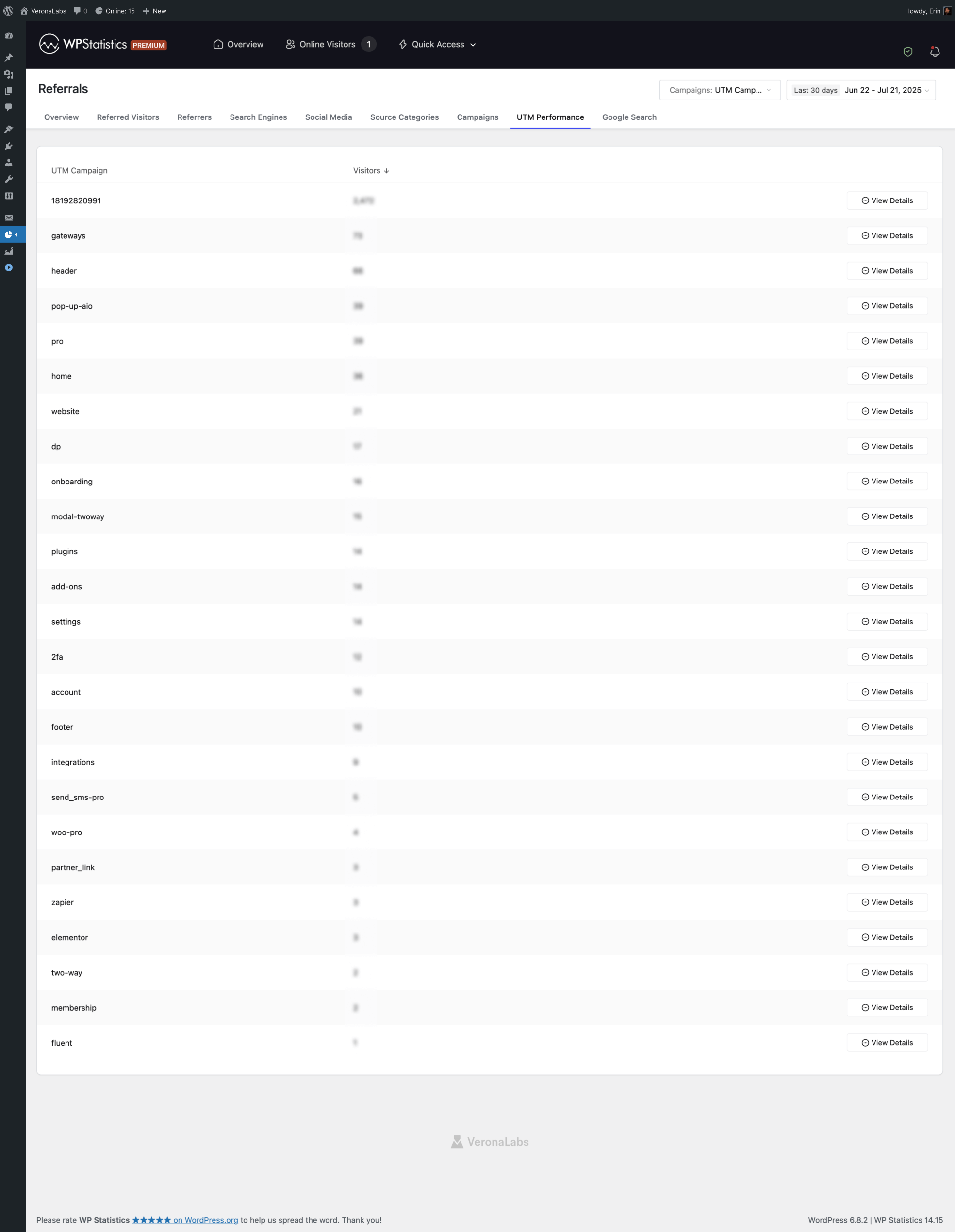
Moreover, WP Statistics is a privacy-friendly platform that stores all data locally on WordPress. It doesn’t share your data with third-party tools for monetization and re-targeting.
Features of WP Statistics
- On-Site Tracking: Tracking visitors on your website.
- Source Tracking: Monitoring where your traffic is coming from, including search engines and social media.
- Referrer Analysis: Segmenting external sources that are driving traffic to your site.
- Real-time Stats: Tracking visitor activity in real-time.
- Goal Analytics: Defining custom events.
- Google Integration: Using the capabilities of Google Search Console within WP Statistics.
- Content & Author Analytics: Comparing the performance of your posts and authors.
Pricing of WP Statistics
| Plan | Features | Price | |
| Free | Basic visitor tracking, real-time stats | $0 | |
| Premium | All features and add-ons | 1 site | $119/year |
| 5 sites | $249/year | ||
| Unlimited | $449/year | ||
Pros of WP Statistics
- Data stays local and private
- GDPR-friendly
- Easy to set up
- Real-time visitor tracking
- Reliable GA4 alternative
Cons of WP Statistics
- Add-ons might be expensive.
2. MonsterInsights

MonsterInsights is one of the most popular Google Analytics integrations for WordPress. It offers important features of GA4 and additional tracking options to make your job easier for tracking your Ad campaigns.
It’s great for various websites ranging from bloggers to small businesses and WooCommerce stores. If you’re looking for a simple way to track ad campaigns and conversions, this is your best choice.
Features of MonsterInsights
- UTM Campaign Reporting: You can track the success of all campaigns with UTM parameters.
- Ecommerce Tracking: It integrates with WooCommerce so you can monitor product performance and customer behavior.
- Event Tracking: It can monitor specific actions, button clicks, downloads, etc.
- Custom Dimensions: You can define custom data.
- AdSense Tracking: It’s possible to track AdSense earnings directly inside WordPress.
Pricing of MonsterInsights
| Plan | Features | Price |
| Free | Basic Google Analytics integration | $0 |
| Plus | UTM tracking, eCommerce tracking, enhanced reports | $99.50/year |
| Pro | Advanced eCommerce, AdSense, premium support, more integrations | $199.50/year |
| Elite | Insights into both WHAT and WHY, priority support, all features | $299.50/year |
Pros of MonsterInsights
- Beginner-friendly setup
- Clean reporting dashboard
- Google Analytics integration
- Real-time reports
- WooCommerce and eCommerce integration
Cons of MonsterInsights
- Premium features might be expensive
- Limited advanced features
3. ExactMetrics

ExactMetrics is another advanced Google Analytics plugin for WordPress sites. It offers detailed reports for campaigns and is ideal for agencies or larger businesses.
You can customize its deep reports according to your specific requirements and use its integrations with Google tools like Tag Manager.
Features of ExactMetrics
- Campaign Tracking: Tracking UTM campaigns and custom parameters in detail.
- Affiliate Link Tracking: Analyzing the performance of affiliate links and identifying high-converting products.
- Form Conversion Tracking: Measuring form submissions and conversions.
- Ecommerce Reports: Tracking sales, checkout behavior, and more.
- Customizable Reports: Creating detailed reports tailored to your business needs.
- Google Tag Manager Support: Managing tracking tags.
Pricing of ExactMetrics
| Plan | Features | Price |
| Free | Basic tracking and reports | $0 |
| Plus | Standard features, EU compliance, AI insights, and reports | $99.50/year |
| Pro | Advanced reports, campaign & affiliate tracking, Google Tag Manager support, enhanced eCommerce | $199.50/year |
Pros of ExactMetrics
- Advanced, customizable reports
- Great for multiple-site management
- Google Tag Manager support
- Detailed affiliate and conversion tracking
Cons of ExactMetrics
- Overwhelming for beginners.
- Some features require manual setup.
- The premium version might be expensive.
4. PixelYourSite

PixelYourSite is one of the most powerful web analytics plugins for WordPress websites. It focuses on pixel and event tracking for paid ads, especially Facebook and Google Ads.
This tracking tool is ideal for eCommerce stores and business owners who want to run retargeting campaigns.
Also, PixelYourSite has useful integrations with Facebook Pixel, Google Ads, and other tracking systems.
Features of PixelYourSite
- Facebook Pixel Integration: Managing Facebook Pixel to track user behavior and conversions.
- Google Ads: Integrating with Google Ads to monitor clicks and conversions.
- Custom Event: Tracking user actions like button clicks, page visits, and form submissions.
- Dynamic Product Ads: Ecommerce stores can run dynamic product ads on Facebook and Instagram.
- Conversion API: Using server-side tracking to improve event accuracy.
Pricing of PixelYourSite
| Plan | Features | Price |
| Free | Basic Facebook Pixel and Google Ads tracking | $0 |
| Starter | Advanced tracking, dynamic \ads, and retargeting features | $359/year |
| Advanced | Enhanced features beyond Starter, including more integrations | $399/year |
| Agency | Multiple client support, bulk integrations | $999/year |
Pros of PixelYourSite
- Deep integration with Facebook and Google Ads
- Ideal for retargeting
- Dynamic product ads
- Easy setup and management
- Server-side tracking
Cons of PixelYourSite
- Technical setup for Facebook Ads Manager/Google Ads
- Focused only on paid ad platforms
- Not suitable for organic tracking
To choose a plugin, you’d better compare these tools:
| Tool | Best For | Interface | Goal Tracking | Ideal Business Type |
| WP Statistics | Local tracking | Easy | Advanced | Privacy-Focused Sites |
| MonsterInsights | General tracking | Easy | Yes | SMBs, Bloggers, WooCommerce Stores |
| ExactMetrics | Advanced reporting | Medium | Yes | Agencies, Large Businesses |
| PixelYourSite | Paid ads | Medium | Advanced | Ecommerce, Paid Advertisers |
Overall, WP Statistics is a better choice because it provides a more complete tracking setup for both SEO and Ad tracking purposes.
How to Track and Compare Ad Campaign Traffic Inside WordPress Effectively
Here’s how to use WP Statistics for WordPress advertising traffic tracking:
Step 1: Enable Marketing Add-on
You have to enable the Marketing add-on to be able to track goals and UTM parameters for your Ad campaigns. It’s better to go Premium to have all the available add-ons, including Marketing.
Step 2: Use UTM Links for Every Campaign
WP Statistics uses UTM parameters to identify where your site’s traffic comes from. So, before launching any campaign, create UTM links.
Here is how to create your UTM:
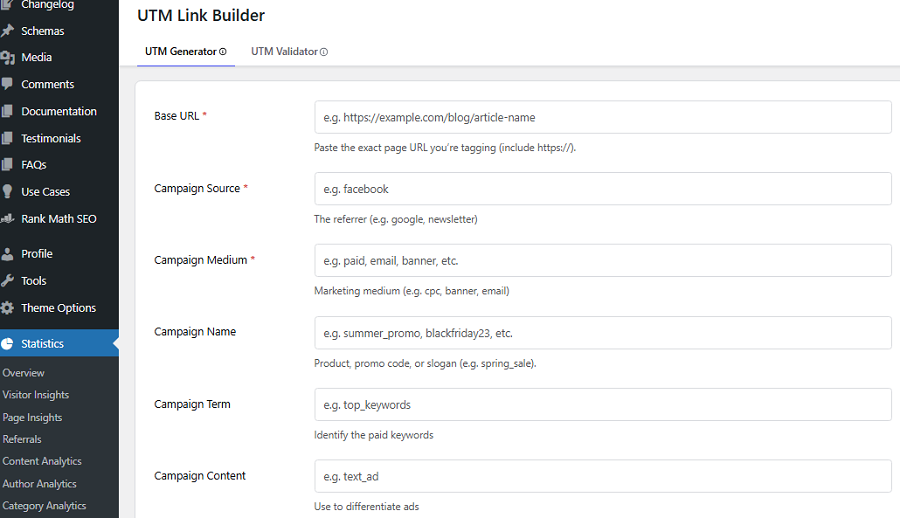
- Go to Statistics
- Click Campaign Builder
- Fill the blank areas, including Base URL, Campaign Source, referrer,
- Campaign Medium, Marketing medium, Campaign Name, Product, promo code, or slogan, etc.
- Click Generate URL & Save.
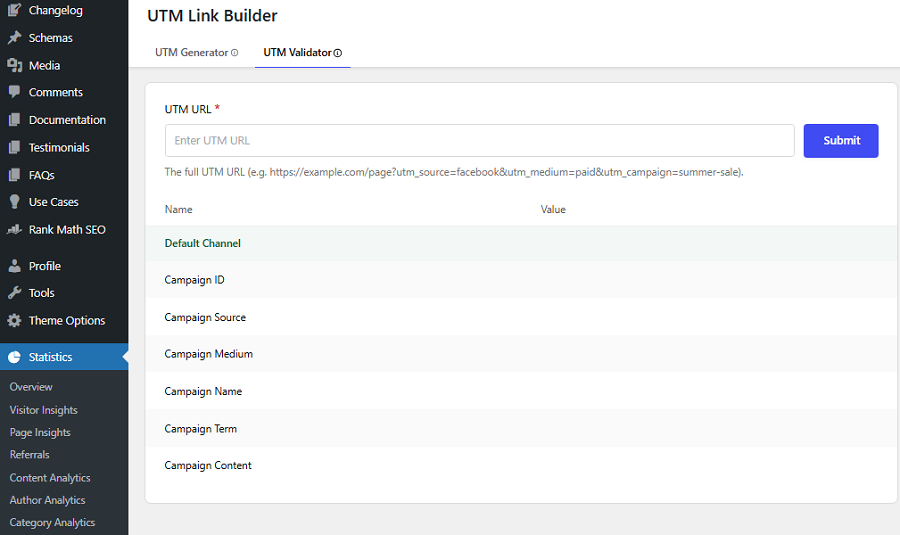
You can also see a list of recent links and use the UTM Validator feature of WP Statistics to see if a UTM link works.
Try to be consistent in defining parameters to prevent confusion. For example, always try to use lowercase and avoid spaces in parameters. Instead, you can use underscores to make them more readable.
Here are some sample UTM parameters:
| Good UTM | Bad UTM |
| utm_source=facebook utm_medium=cpc utm_campaign=black_friday_2026 | utm_source=FacebookAds utm_campaign=Black Friday Sale |
This way, you can get clean reports from WP Statistics.
Step 3: Segment Traffic by Source & Medium
Now, you can review UTM parameters, like:
- UTM Source
- UTM Medium
- UTM Campaign
This way, you can compare different channels like Facebook, Instagram, Google paid search, and other sources. Remember that you should not compare campaigns without proper tagging.
Step 4: Track Key Actions
Track user clicks on buttons, links, and other elements. It just needs a simple setup to define these actions as goals.
Step 5: Calculate the ROI
Now, you have to estimate the ROI of your paid campaigns to see if you’ve performed well. You just need to separate the campaigns that have converted users to customers and compare the income against the investment.
Tips for Improving Your Campaigns Using Analytics Results
Consider the following best practices when tracking Ad campaign traffic for your WordPress website:
1. Track Bounce Rate
Bounce rate shows how many visitors leave your site without clicking. A high bounce rate usually shows people don’t like your content/product.
So, even if an ad campaign has high traffic, you have to check the high bounce rate to make sure the landing page is working well.
If the bounce rate is high, there might be several issues:
- Your ad message doesn’t match your landing page
- Your landing page loads too slowly
- The offer isn’t clear or attractive enough
- The audience targeting is wrong
2. Consider Conversions When Tracking Traffic
As said earlier, you should not focus only on the traffic of your ad campaigns. Your main goal is to sell something, so you have to measure conversions:
- How many visitors turned into leads
- How many completed a purchase
- How many signed up
You might have a campaign with higher traffic but lower sales. You have to find the issue and try to optimize your future campaigns.
4. Compare Ad Campaigns with Organic Traffic
Organic traffic from search engines is sometimes more effective than paid campaigns. If you want to optimize your strategies and reach better results, you have to figure out which channel is working better.
Try to measure the effectiveness of organic traffic and Ad campaigns and compare them. This way, you can budget wisely and improve your campaigns in the future.
Final Thoughts
Thanks to WordPress plugins, you can now easily track your Ad campaigns along with SEO metrics inside your WordPress dashboard.
This helps you quickly recognize spikes and drops and take suitable measures.
Also, you can find the best and worst campaigns and refine your future strategies accordingly.
WP Statistics offers useful features and add-ons for tracking campaigns, events, and goals, and is great for blogs and SMBs.
You can try its free version to make sure about its capabilities and then go premium to experience a professional tracking platform.
FAQs
How to track advertising campaigns on WordPress?
You just need to install a tracking plugin like WP Statistics.
What is a campaign tracker?
A campaign tracker is any tool that can collect and analyze data on your Ad campaigns.
What is ad tracking?
Ad tracking is monitoring the interactions of users with your ads.