
If you don’t know why your site can’t convert visitors into customers, you’ve come to the right place.
Table of Contents
One of the critical points in your customers’ journey is the landing page. Your site’s landing pages might attract thousands of visitors, but fail to keep them engaged.
With effective landing page analytics, you can find and solve many problems regarding UI, UX, content, and CTAs.
In this blog post, we’ll explain the importance of landing page tracking and introduce the key metrics for analyzing and improving conversion on your website.
Why You Need Landing Page Analytics
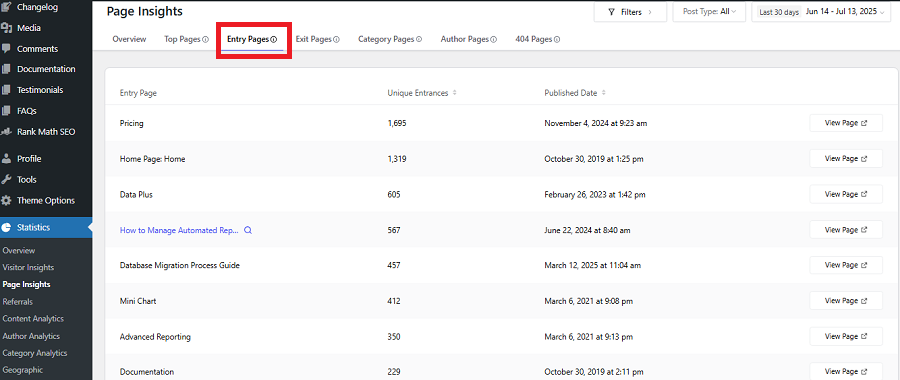
The point where visitors first open your site is important because it indicates how they discovered your brand.
So, you need to pay special attention to landing pages and analyze them to understand user behavior and find strengths and weaknesses.
Here are key benefits of landing page analytics:
1. Understand Where Your Visitors Come From
Each visitor arrives with a different intent and from a different source. Landing page analytics gives you detailed insights into your traffic sources, like:
- Organic search
- Paid search
- Social media
- Email campaigns
- Referral websites
- Display advertising
- Direct traffic
- Campaign-specific links
So, you can understand why some visitors behave differently.
People who come using organic links have different intentions from those who click a promotional post on social media.
In fact, the overall conversion rate can’t show these differences and is not enough for analyzing user behavior.
Landing page tracking allows you to see the relationship between source, visitor intent, and conversion behavior.
2. Identify Where Visitors Drop Off
Landing page analytics doesn’t stop at the landing page itself. You have to track the user path until he/she completes an action or leave your site.
Analyzing the user journey from landing page to lead generation helps you find drop-off points:
Ad click → Landing page → CTA click → Form interaction → Form completion → Lead
Suitable landing page tracking shows where the journey weakens.
3. Separate Traffic Problems From Conversion Problems
Landing page analytics helps you distinguish between traffic issues and conversion experience problems.
Low traffic usually indicates problems with SEO, ads, targeting, etc. On the other hand, low conversion is about your message, CTA, UX, offer, or trust.
When you analyze user behavior from the landing page to checkout, you don’t waste your time on the wrong problem.
4. Make Data-Driven Optimization Decisions
Although experience and expertise are key to improving your website, you can’t rely solely on them. Without insights, everyone might make mistakes and face financial losses.
Landing page monitoring gives you data that makes decision-making much easier and stronger.
When you track visitors from the beginning, the risk of overlooking problems decreases, and your interpretation of your site’s performance improves.
Key Metrics for Landing Page Analytics
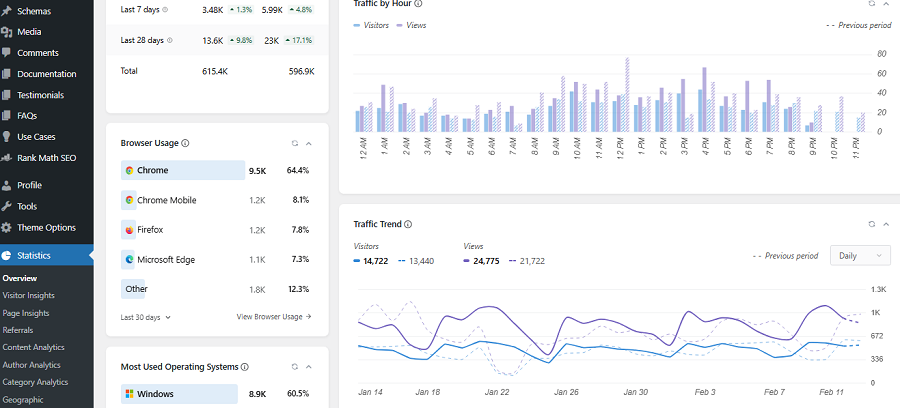
Here is what to consider when analyzing your landing pages and customer journey from the beginning to lead:
Traffic Metrics
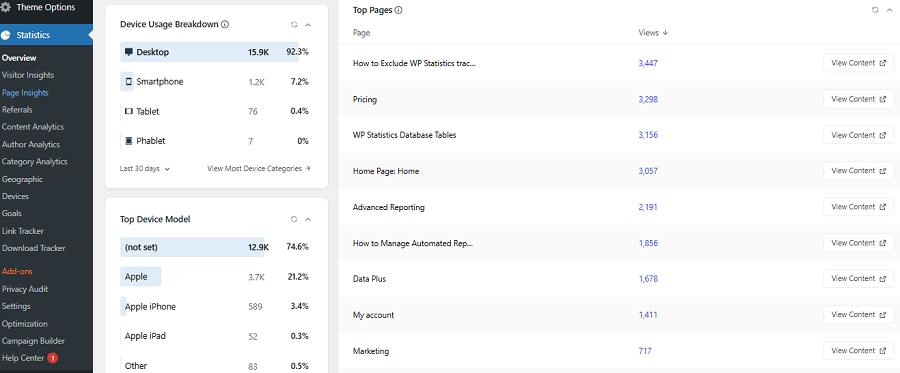
Traffic metrics help you understand where your landing pages get their traffic. Here are the most useful traffic metrics for landing page analysis:
1. Users
This shows the number of unique visitors that open your website or app during the reporting period.
The number of users is the best metric to figure out your business’s true audience size. If you track this metric, you can understand if your audience is growing or which landing page attracts the most users. However, it doesn’t give any behavioral insights or the source of traffic.
2. Sessions
A session is a visit to your website that can include a short period of activity or multiple pageviews.
In fact, a landing page is the start of a session, and sometimes can also be its end. A user can create several sessions in the tracking period.
3. New vs Returning Users
New users are those who are visiting your site for the first time. This metric indicates whether your audience reach is improving.
This is especially useful for acquisition campaigns because you need to find potential customers and generate leads.
However, new-user volume is not necessarily a success metric. You need to interpret it alongside returning visitors. They are usually your loyal customers and are important for businesses of all sizes and types.
4. Traffic Sources
Traffic source is sometimes more actionable than total traffic because it gives you details of your visitors, not just the raw numbers. That’s why business owners use methods like UTM links to track:
- Source
- Medium
- Campaign
- Channel
- Landing page
- Device
This determines whether performance problems are about the whole campaign/website or come from particular acquisition segments.
Engagement Metrics
This is important to know what users are doing on your site:
5. Engagement Rate
This is the percentage of sessions that have meaningful engagement. In other words, it tracks sessions that:
- Last longer than 10 seconds
- Include a key event
- Contain at least two page or screen views
A high engagement rate is usually considered a positive signal, but it doesn’t necessarily mean your page converts well.
For example, a visitor might spend several minutes reading your page or comparing products, but leaves your site without purchasing.
6. Bounce Rate
Bounce rate is the opposite of engagement rate. It’s only useful when you interpret it in context.
A high bounce rate can indicate:
- Poor message match
- Irrelevant traffic
- Slow loading
- Weak first impression
- Confusing navigation
- Poor mobile experience
- Visitors finding the information they need immediately
But it’s not necessarily a negative signal. It can also occur on a page that successfully answers a simple question.
Try to interpret it alongside engagement rate, traffic quality, and your page intent.
7. Average Engagement Time
Average engagement time gives you additional details about your visitors’ behavior. It tells you how much time visitors spend actively engaged with the site.
Again, you need to be careful when interpreting this metric. More time is not automatically better.
If a page needs extensive explanation, longer engagement is necessary. Otherwise, longer time indicates confusion and friction.
8. Scroll Depth
Scroll depth can also help you identify whether visitors reach important sections of your landing page.
For example, if your testimonial section is near the bottom, only a small portion of visitors might reach it, even if they spend a long time on your page.
So, you need another metric to measure the effectiveness of your page design. Scroll depth gives you this useful insight to see if you’ve placed your items wisely.
Scroll behavior is especially useful when you combine its results with:
- CTA clicks
- Engagement
- Device
- Conversion rate
- Form interactions
Conversion Metrics
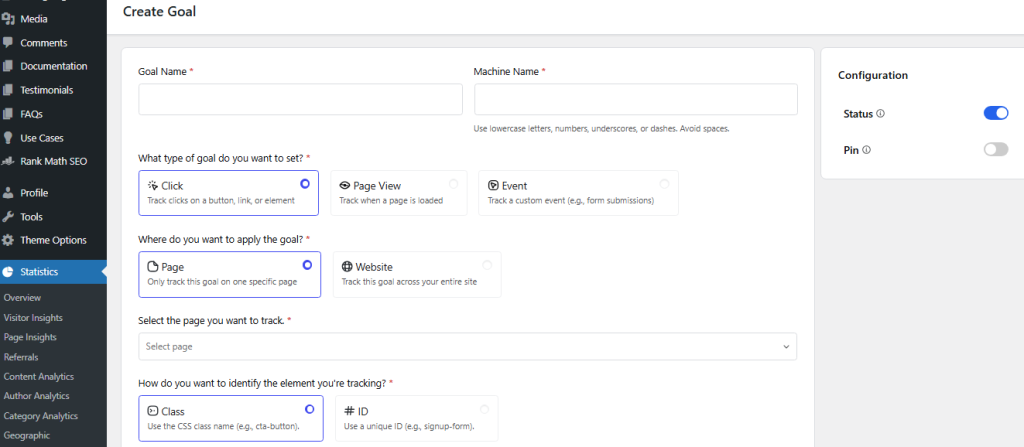
Conversion metrics connect visitor behavior to business outcomes. So, they’re the most important metrics to measure your goal performance.
9. Conversion Rate
This shows how many visitors take your desired action, like:
- Purchase
- Lead submission
- Demo request
- Newsletter signup
- Account creation
- Quote request
- Download
- Phone call
- Appointment booking
10. Total Conversions
You have to keep a record of the total number of desired actions occurring on your site.
If you just consider conversion rate, you might make a mistake finding your best landing pages. The reason is that if the traffic to the landing page is low, even if it has a high conversion rate, you can’t consider it a successful page.
So, you have to measure total conversions and interpret them along with other metrics to have a clear understanding of the page performance.
11. Form Submissions
Completing forms is a critical KPI, especially for lead-generation landing pages. However, many website owners make a big mistake and track only completed forms.
This can hide friction and prevent them from finding issues in the customer journey. You need to consider the whole form interaction journey, like this:
Form viewed → Form started → Field interaction → Form submitted.
Now, you can analyze how many visitors have interacted with the form and what percentage of them submitted the form.
12. CTA Clicks
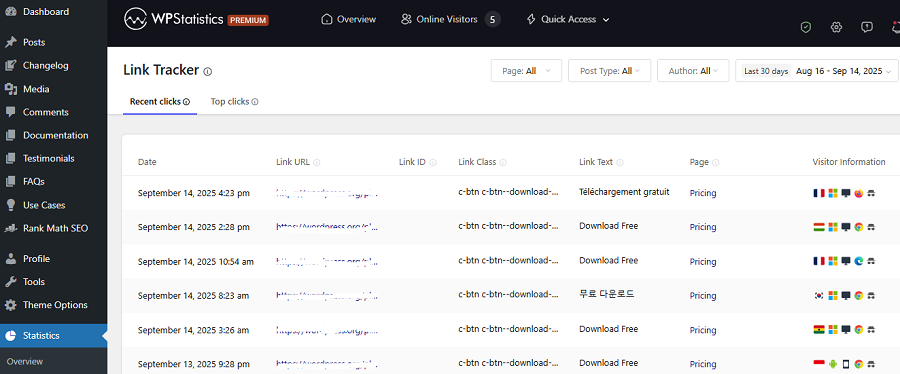
CTA clicks are another critical interaction you have to consider when analyzing your website, especially landing pages.
Here are some common CTA examples that you need to track:
- “Get a Quote”
- “Start Free Trial”
- “Book a Demo”
- “Download Guide”
- “Buy Now”
A high CTA click rate is a positive signal, but if it doesn’t lead to conversion, it indicates a problem in the user journey.
13. Micro-Conversions
Micro-conversions are small actions that customers take through their path toward the main goal.
For example, they view pricing, watch a product video, add it to the shopping cart, compare two products, and finally buy it.
You must track micro-conversions to see what users usually do during their journey from the landing page to checkout.
Acquisition and Revenue Metrics
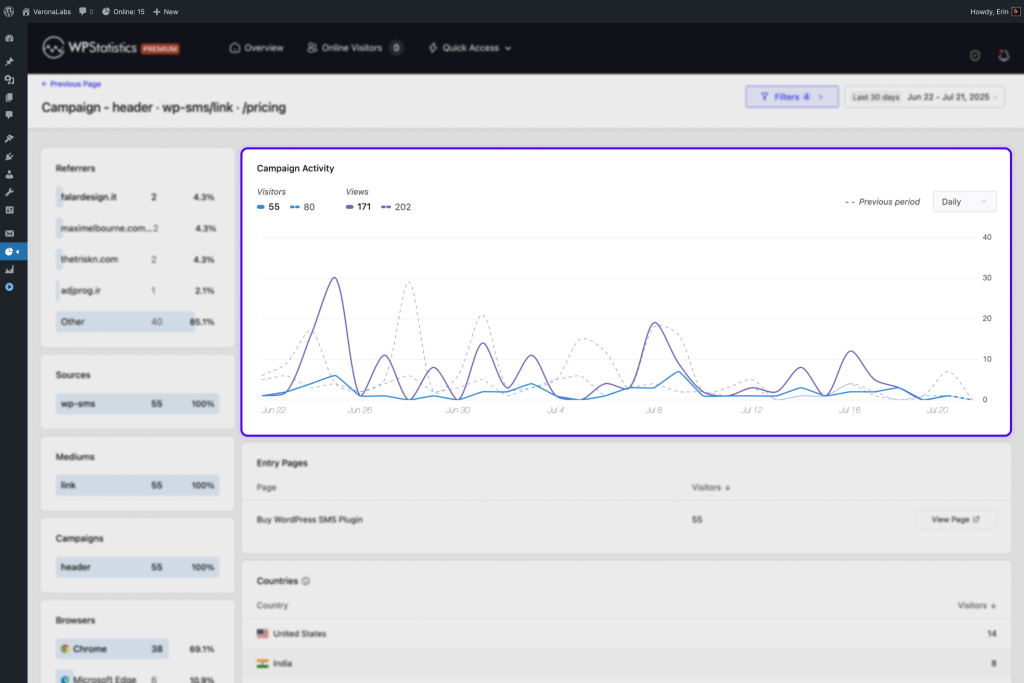
Last but not least, you must measure your revenue and compare it with what you have spent on it.
14. Cost Per Acquisition
CPA measures how much it costs to attract a customer who pays for a product. It has a simple formula:
CPA = Acquisition cost ÷ Number of acquisitions
You have to optimize your acquisition techniques and reduce CPA. This way, a landing page can lead to more conversions even if traffic stays constant.
15. Return on Ad Spend
ROAS connects advertising spend with your revenue, which is important for paid campaigns.
In fact, you have to specifically track the paid traffic your landing page receives and understand if it’s worth the investment.
Your page might have an impressive conversion rate but produce low-value customers.
Another page might have a lower conversion rate but generate significantly higher revenue per customer.
ROAS is part of ROI, which measures your website efficiency considering the whole investment, including ads, SEO, social, events, etc.
16. Revenue Per Visitor
Revenue per visitor can help you connect landing page performance with financial outcomes.
For ecommerce, this can be particularly useful because two pages may generate similar conversion rates but different average order values.
Tips for Landing Page Performance Improvement
Tracking landing page metrics is just the beginning. Here is what to do to improve your website performance:
1. Improve the Headline
You need to come up with a headline that quickly makes your page’s purpose clear. If your visitors arrive from an advertisement that promises something, your landing page’s first impression should clarify immediately.
If your headline talks about something else, you’ll probably lose many of the visitors, even if the rest of the landing page explains your offer accurately.
2. Strengthen the CTA
Your CTA should be compelling and make the next step obvious. If you just use a general word like “Submit”, you can’t expect all visitors to understand what they have to do.
Instead, a more descriptive action such as “Get My Free Quote” lets them know what they’ll see after clicking.
It’s good to choose your CTAs depending on your offer and audience. Try to avoid assuming that a particular phrase universally performs better.
3. Reduce Distractions
Your landing page should focus on a single purpose. So, do not include every navigation link, animation, popup, social link, or secondary CTA on your landing page.
Every additional element competes for attention and will reduce the click rate of your main CTA.
However, you should also avoid making the page extremely minimal. You can use insights from heatmaps and session recordings to understand user behavior, find the best CTA placement, and prevent distractions.
4. Improve Landing Page Speed
One of the biggest problems that make visitors leave landing pages is the loading speed of the page.
Slow pages can prevent strong campaigns from reaching success. You have to constantly analyze your landing pages in terms of technical issues and check Core Web Vitals to make sure your content loads perfectly.
If analytics shows weaker performance on particular devices, you need to investigate technical performance alongside behavioral metrics.
It’s good to analyze:
- Mobile versus desktop
- Browser
- Geographic segments
- Traffic source
- Conversion rate
5. Optimize the Mobile Experience
As you know, the majority of internet traffic comes from mobile devices. So, mobile performance is specifically important in your analysis.
Do not treat mobile experience as a smaller version of desktop, and make sure that your page has a responsive design.
Moreover, check every item separately, including:
- CTA visibility
- Form usability
- Font sizes
- Page spacing
- Image dimensions
- Sticky elements
- Popups
- Checkout flow
- Load performance
6. Simplify Forms
Forms are common conversion bottlenecks. So, you have to specifically work on them to make sure they’re simple and effective.
It’s good to consider the following optimizations:
- Fewer fields
- Better field labels
- Clearer error messages
- Better mobile inputs
- Multi-step forms
- Stronger reassurance
- More obvious completion feedback
7. Improve Consistency
Your visitors should face a consistent path in their journey. If an ad promises “30% off annual plans” and the landing page doesn’t talk about it, the visitor might leave your site.
Make sure that your tone, message, and style match and represent your brand culture.
8. Add Appropriate Trust Signals
Depending on your business, you can use different trust signals, including:
- Customer reviews
- Testimonials
- Security information
- Guarantees
- Certifications
- Client logos
- Transparent pricing
- Clear contact information
- Return or cancellation policies
9. Segment Visitors Instead of Relying on Overall Averages
An overall conversion rate can hide major differences. At minimum, consider comparing:
- Mobile vs. desktop
- New vs. returning users
- Organic vs. paid traffic
- Campaigns
- Geographic markets
- High-intent vs. low-intent sources
A landing page that looks average overall may perform extremely well for one segment and extremely poorly for another.
10. Use the Right Analytics Tool
Finally, you have to use the right web analytics tool for landing page tracking. Many website owners go for Google Analytics by default, but it’s not the best choice in many cases.
GA4 is the strongest analytics tool available out there, but it has some issues, like:
- Complexity for beginners
- Using cookies
- Cross-website tracking
- Requiring a Google account
If you need the same accuracy as Google Analytics while staying privacy-focused, you can think of alternatives like WP Statistics.
It’s a WordPress plugin that brings advanced tracking services directly into your dashboard. So, you don’t need to switch between your CMS and web analytics account.
Moreover, it avoids using cookies and stores your data locally on WordPress. This is particularly important for organizations that work with sensitive user data.
WP Statistics hashes IP addresses and tracks user behavior anonymously. This makes it GDPR-compliant by design.
It’s great for landing page analytics and offers features like:
- Entry page
- Exit page
- Views
- Visitor analytics
- Content analytics
- Author analytics
- Campaign builder
- Custom event and goal tracking
You can access the code of this open-source tool on GitHub and make sure about its tracking algorithm.
So, why wait? Install WP Statistics and get started with your landing page analytics.
Conclusion
An effective analytics approach is essential for running a successful website. One key part of web analytics is tracking landing pages and the user journey from entry page to exit pages. If you just track the number of users, you can’t find problems and drop-off points. Landing page metrics give you detailed insights into what users want more and what makes them leave your site. Tools like GA4 and WP Statistics can measure many details on your landing page, including sources, devices, browsers, and events. Of course, you have to interpret the metrics correctly and find strengths and weaknesses to optimize your website. If you need more info about landing page tracking, you can always contact our team at WP Statistics.
FAQs
How to analyze a landing page?
Analyze key metrics like traffic sources, engagement, user behavior, conversion rate, and CTA clicks. Find drop-offs and reasons to optimize your landing pages.
What is a landing page in Google Analytics?
In Google Analytics 4, a landing page is the first page a visitor views when starting a session on your site.
What are some important metrics to track for a landing page?
Key landing page metrics are users, sessions, traffic sources, engagement rate, bounce rate, average engagement time, conversion rate, conversions, and CTA clicks.