
An ultimate website audit checklist for small businesses.
Even the best websites with professional designs and optimized content can fail to gain traffic and generate leads.
Table of Contents
Your pages might seem polished, and your content might appear SEO-friendly, but still have visibility problems.
That’s why every website needs a regular audit to detect issues and fix them before damaging its authority and ranking.
You need a complete audit strategy to examine your website, considering both technical and content metrics.
This is a complete audit checklist that helps you take every important factor into account and ensure better performance and SEO. Of course, you don’t need to fix all the issues at once. We help you prioritize problems and fix them strategically.
What Is a Website Audit?
A website audit is a systematic checkup of a website’s performance. The purpose of a website audit is to identify your site’s problems that affect its:
- Search visibility
- Technical health
- Performance
- Usability
- Security
- Content quality
- Conversions
In fact, an audit is a health check for your website. Based on your requirements, you might run different levels of checks in your website audits.
For a small website, you might need a basic audit to identify broken links and missing title tags.
However, large websites need comprehensive audits including all website KPIs to find technical and content issues.
Benefits of Website Audit
The internet is an ever-changing world, and your content strategy that worked two years ago might not work this year,
Moreover, websites also change constantly. A simple redesign can create incorrect redirects or accidentally add noindex.
So, you can’t be sure about your website performance unless you check it regularly. Here is a summary of website audit benefits:
- Determining problems in your website content.
- Identifying opportunities for content repurposing.
- Diagnosing content gaps.
- Evaluating content quality.
- Improving your information structure.
How Often Should You Audit a Website?
There is no specific formula for determining the right schedule for a site audit. It depends on the site’s size and rate of change.
The following table offers a reasonable benchmark:
| Website type | Suggested audit frequency |
| Small personal/blog site | 6–12 months |
| Small business website | 6 months |
| Active content website | 3–6 months |
| E-commerce website | Quarterly |
| Large enterprise website | Continuous monitoring |
| Website after redesign/migration | Full audit immediately after launch |
A Complete Website Audit Checklist in 2026
Here is what you have to check on your site’s performance and SEO:
Website Accessibility and Crawlability
You want to rank first on Google, but before that, Google should be able to find and access your pages.
Google’s technical requirements are simple:
- Googlebot needs to be able to access the page
- The page should return a successful response such as HTTP 200
- It needs indexable content
So, if you want to index your page, you have to meet these requirements. Here are the most important factors you have to check to make sure your pages are crawlable:
1. robots.txt
Open https://example.com/robots.txt.
Check that the file exists when your site needs one. Also, make sure important sections are not accidentally disallowed.
A common mistake is assuming that if you make “Disallow: /private/”, the URL can never appear in Google.
robots.txt primarily controls crawling. Even if your URL is blocked by robots.txt, it can still potentially appear in search results if Google discovers the URL elsewhere.
If you need to prevent indexing, you need to use an appropriate indexing control such as noindex or authentication.
2. The XML Sitemap
Verify that your XML sitemap loads successfully. It should also contain the canonical versions of important URLs.
Check that it does not contain large numbers of redirects or errors and is referenced in robots.txt or submitted through Search Console.
You also need to update it when important content changes. Remember that submitting a sitemap is a hint, not a guarantee that Google will crawl or index every URL in it.
3. Crawlability
You have to make sure that Googlebot can reach important pages and that all of your internal links are crawlable.
Sometimes important resources are blocked, and this can cause issues. Also, JavaScript-dependent pages might not be rendering correctly.
4. Orphan Pages
An orphan page on your site is a page that you have not linked to from any other pages. So, you need to check your site in terms of internal links.
You can find orphan pages in:
- XML sitemaps
- CMS databases
- Analytics
- Search Console
- Old campaigns
- Historical URLs
When you find an orphan page, you need to add relevant internal links from authoritative pages.
5. Crawl Depth
You need to ensure your important pages are close to the site’s primary navigation and internal linking structure.
In other words, customers and crawlers should be able to find your product pages without clicking unnecessary links.
So, in your website audit, make sure that there is no complex category and linking structure for reaching important pages.
6. HTTP Status Codes
Important URLs should return appropriate responses. So, check them for status and common errors, like
- 200: Successful page
- 301: Permanent redirect
- 302: Temporary redirect
- 404: Not found
- 410: Gone
- 5xx: Server error
You can’t automatically consider every non-200 response as a problem.
Indexability
Some beginners mistake crawling for indexing. Crawling means Google accesses your URL, while indexing means Google processes your page and stores information about it in its index.
So, you can rank for a query when Google determines how relevant and useful your indexed page is for a particular search.
Your page can be crawlable but not indexed by Google. It can also be indexed but perform poorly in search.
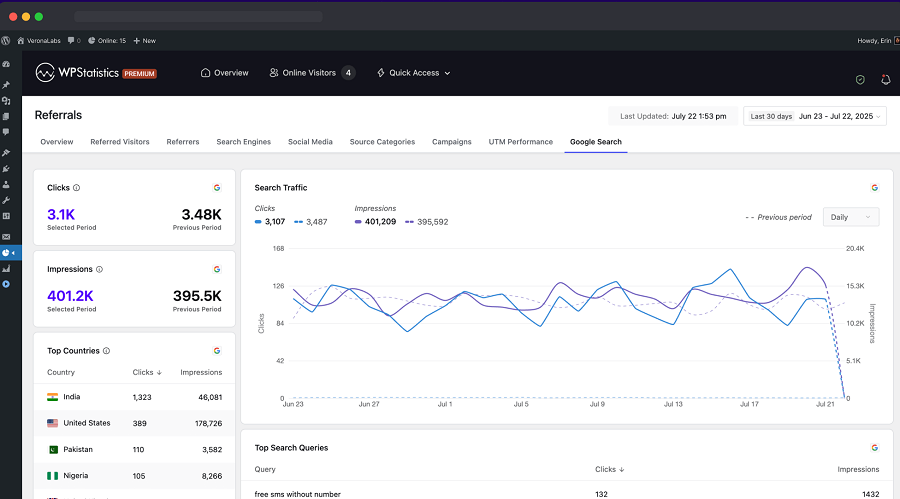
Google Search Console is the best tool to check your pages’ indexing issues.
Of course, “not indexed” does not automatically mean something is wrong. Some URLs should intentionally remain outside the index because customers don’t need to find them.
7. Noindex Directives
A noindex directive tells search engines not to include the page in their search results. But Google should crawl the page to see the directive. If robots.txt blocks the page, Google may not see the noindex instruction.
So, you have to inspect important pages for noindex using:
- <meta name=”robots” content=”noindex”>
- HTTP X-Robots-Tag
This is especially important after:
- Website migrations
- WordPress staging deployments
- Theme changes
- SEO plugin changes
- Template updates
8. Canonical URLs
Sometimes you have several URL versions for a single page. You need to tell search engines which URL represents your content. In your website audit, you need to check for:
- Missing canonicals
- Canonicals pointing to irrelevant pages
- Canonicals pointing to redirected URLs
- Conflicting canonical signals
- Multiple canonical tags
- Canonicals pointing to non-indexable pages
This helps search engines identify the source of content and prevents duplicate versions from competing with each other.
Google can automatically identify duplicate content. However, you need to have a clean architecture and canonical signals to make the website easier to manage.
Look for duplication caused by:
- URL parameters
- Trailing slashes
- HTTP/HTTPS
- WWW/non-WWW versions
- Uppercase/lowercase URLs
- Print versions
- Tag archives
- Search pages
- Filter pages
- Duplicate category paths
Website Performance and Core Web Vitals
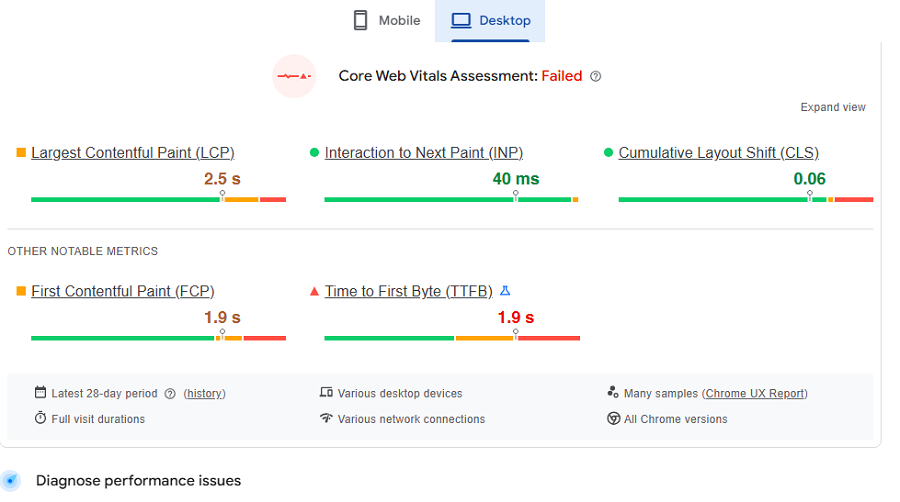
Website technical performance greatly impacts user experience and is an important part of website quality.
There are specific metrics that measure the loading performance of your website, called “Core Web Vitals”. Here is what they measure:
- Largest Contentful Paint (LCP): Loading performance
- Interaction to Next Paint (INP): Responsiveness
- Cumulative Layout Shift (CLS): Visual stability
The following table shows a good benchmark for these metrics:
| Metric | Good target | Common problems |
| LCP | ≤ 2.5s | Slow server, large images, render-blocking resources |
| INP | ≤ 200ms | Heavy JavaScript, long tasks, inefficient event handlers |
| CLS | ≤ 0.1 | Images without dimensions, injected content, unstable fonts |
PageSpeed Insights by Google distinguishes between real-user data and lab measurements and is the best tool for checking these metrics.
9. LCP
In your website audit, try to check LCP and find the largest visible element during loading.
Typical LCP elements are:
- Hero images
- Large headings
- Banners
- Featured content blocks
If you have a huge hero image as the LCP element, compressing and correctly sizing that image can have more benefits than dozens of tiny CSS optimizations.
10. INP
INP is about functions visitors run on your site and the responsiveness of your pages. It’s strongly influenced by JavaScript execution.
When auditing your site, check:
- Heavy scripts
- Large third-party libraries
- Long JavaScript tasks
- Complex menus
- Sluggish search interfaces
- Excessive tracking scripts
- Unoptimized interactive components
11. CLS
Sometimes pages move while users interact with them. You have to find the reason and remove it.
For example, there might be images without dimensions, or some ads are inserted dynamically.
Late-loading fonts can also change users’ view when they’re reading, which damages user experience.
So, every time you change the design or add an element like dynamic banners, you have to check the result.
12. Server Response Time
The speed of your host is one of the most important factors affecting user experience. Slow hosting can make your optimization efforts less effective.
Make sure of hosting quality, database performance, and server-side caching. Some website owners think that moving to a CDN will solve every performance problem. A CDN cannot compensate for inefficient application code or an overloaded origin server.
13. Optimize Images
Images are responsible for many slow-loading pages. Try to audit your site considering images and check:
- File dimensions
- Compression
- Format
- Responsive image delivery
- Lazy loading
- Image priority
- Unnecessary decorative images
It’s recommended to use the .webp format because it doesn’t reduce the quality of the image while reducing its size.
14. CSS and JavaScript
Unnecessary CSS and JavaScript code will slow your pages. When auditing your website, you have to look for:
- Unused CSS
- Excessive JavaScript
- Render-blocking resources
- Large bundles
- Duplicate libraries
- Scripts loaded on pages where they are unnecessary
15. Third-Party Scripts
Third-party services might be useful, but they make your pages heavy to load. Here are some common scripts:
- Analytics
- Advertising
- Chat widgets
- Heatmaps
- Social media embeds
- A/B testing
- Marketing automation
You have to audit your site’s scripts and find those that provide little value. Many times, removing them is more effective than optimizing them.
16. Mobile-Friendliness
It’s important to know that Google uses the mobile version of your site’s content when it wants to index and rank under mobile-first indexing.
You’d better use responsive web design as the easiest configuration to implement and maintain.
Auditing for mobile-friendliness is especially critical for your site if it receives the majority of its visitors from mobile devices. Many tools like GA4 and WP Statistics offer device reports and help you in this regard.
Try to check everything that might be different on desktop and mobile versions, including:
- Responsive layouts
- Navigation menus
- Font sizes
- Buttons
- Forms
- Tap targets
- Horizontal scrolling
- Pop-ups
- Sticky elements
- Image sizes
- Mobile page speed
- Content parity
17. Content Parity
Although the mobile version of your site is different from its desktop format, important elements should not change. Make sure that text, images, links, structured data, and metadata.
A beautiful desktop page is not enough if the mobile version is missing important content. Also check that important content isn’t loaded only after a user interaction that Google cannot reproduce.
Make sure important content isn’t shown only after a user clicks or interacts with the page, because Google may not be able to see it.
On-Page SEO
On-page SEO is key to ranking in SERPs. As they say, content is king, and on-site SEO is here to optimize your content to make Google recognize your content as relevant.
18. Title Tags
The first and most important item visitors see on your pages is the title. Each of your site’s pages should have a useful and descriptive title.
You should choose a relevant title that accurately represents the content and avoid using duplicate and generic titles.
Optimize your titles considering their length, exact keyword, and uniqueness compared to competitors.
Your page title should help both users and search engines understand what the page is about.
19. Meta Descriptions
Meta descriptions let search engines understand what your content is about. When auditing your on-site SEO, you have to optimize meta descriptions considering the following tips:
- Describe the page accurately
- Reinforce search intent
- Encourage qualified clicks
- Differentiate the page from similar results
20. H1 and Heading Structure
As you know, the title of your page is not necessarily the same as the topic of your article, which is structured as an H1.
You have to consider a clear, relevant, and keyword-focused H1 for your content. Make sure that the H1s on your site have an optimized length.
Moreover, each page should have a clean heading structure that guides readers through the content. Make sure that the headings are compelling and keyword-optimized.
21. Search Intent
As you know, search intents are categorized into four groups:
- Informational
- Navigational
- Commercial
- Transactional
When auditing your blog posts, ask what the user actually wants and check if the page is responding to their needs. For example, if a page has an informational search intent, you should not make it too promotional.
22. Keyword Stuffing
Old-fashioned SEO was about repeating keywords, but nowadays it’s considered spammy. Sometimes, your writers might ignore the fact that Google considers a penalty for keyword stuffing.
So, in your website audit, you have to look for unnatural repetition of:
- Primary keywords
- Locations
- Product names
- Synonyms
- Exact-match phrases
This is critical to note: you need to write for the user first. Writing SEO-only articles will dent your reputation and position in SERPs.
With the rise of artificial intelligence, search engines can easily understand the context and ideas you’re talking about. So, you don’t need to repeat keywords to make them recognize your content.
23. Image Alt Text
Although image recognition capabilities of search engines enable them to understand the content of images, you still need to choose clear and relevant alt text for them.
Alt text should show the purpose of your image and preferably include a relevant keyword.
24. URLs
Good URLs are:
- Descriptive
- Stable
- Concise
- Readable
- Consistent
When auditing your site, if you see a page doesn’t have rank or traffic, it might be useful to optimize its URL.
However, if the page already has acceptable traffic, don’t change the URL because it’s difficult to gain the same traffic for the new URL.
25. Internal Links
Try to build a strong internal linking strategy to make sure important pages receive relevant contextual links.
Do not push too hard for it because using too many links makes your page look like a directory, not an article. Use descriptive anchor text and avoid using exact keywords for all of the links.
26. Content Analytics
You have to regularly update your content. When auditing your website, look for:
- Outdated statistics
- Old product information
- Broken references
- Expired recommendations
- Incorrect screenshots
- Old software instructions
- Changed regulations
- Deprecated technologies
Also, list your best and worst-performing pages and try to find the reason. Tools like WP Statistics offer content analytics features to help you analyze your content’s performance.
This way, you can audit your website and optimize its content strategy to perform better in the future.
27. Author Analytics
This is especially useful for content-based websites. You’d better assess your authors’ performance and assign your most important content to them.
This is much more effective than auditing blog posts separately. Fortunately, tools like WP Statistics offer a built-in feature that measures the performance of writers. So, you don’t need to do extra work to evaluate their work.
28. Keyword Cannibalization
Keyword cannibalization happens when multiple pages on your site target similar keywords and compete with each other. This will impact your pages’ ranking and traffic.
You need a smart content strategy to avoid keyword cannibalization. Try to find pages that focus on the same keywords and edit them carefully.
Each article should have a specific purpose and only mention other keywords briefly or for internal linking.
Technical SEO
Technical SEO is about your website’s software and infrastructure performance so that it can be recognized by search engines without problems.
29. HTTPS
This is a simple but important item on our website audit checklist. Make sure that:
- The entire site uses HTTPS.
- HTTP versions redirect appropriately.
- Internal links use HTTPS.
Also, check that images and scripts are not loaded insecurely and there are no mixed-content warnings.
30. Redirects
Try to find problems like:
- Incorrect 301 redirects
- Unnecessary 302 redirects
- Redirect chains
- Redirect loops
- Redirects to irrelevant pages
- Redirects from old URLs to the wrong destination
31. URL Consistency
You need to decide how your site handles:
- HTTP vs. HTTPS
- WWW vs. non-WWW
- Trailing slashes
- Uppercase characters
- Parameters
In your website audit, check for inconsistencies.
32. Check Hreflang
If your site has multiple language or regional versions, you have to audit hreflang implementation.
You have to make sure that you’re using correct language-region codes on your site.
33. Structured Data
Structured data lets search engines know what type of content you have on your page. Here are common types of structured data:
- Article
- Breadcrumb
- Organization
- LocalBusiness
- Product
- Event
- Recipe
- FAQ-related structured data where applicable
34. Broken Links
Broken links impact user experience and make your site maintenance harder. One of the most important tasks in a website audit is checking for broken links.
You can use a crawler to identify internal links returning:
- 404
- 410
- 5xx
- Unexpected redirects
34. Website Security
Security should be part of your website audit, even if your main goal is improving SEO.
Check important factors like:
- HTTPS
- SSL/TLS certificate validity
- Mixed content
- CMS updates
- Plugin and theme updates
- User permissions
- Exposed administrative interfaces
- Security warnings
- Malware indicators
- Unnecessary software
- Security headers where relevant
35. User Journey
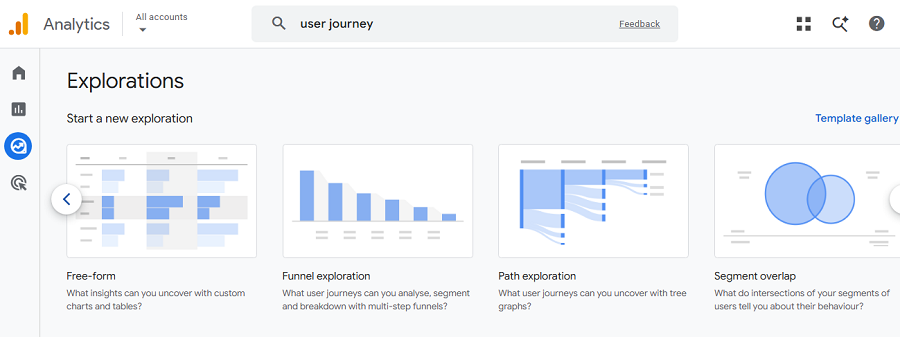
Even if you bring a large number of visitors to your website, you still can’t be sure about your success.
You have to follow users to see what they do and when they drop off. This way, you can understand what they dislike on your site.
Tracking the user journey on your site is a very useful tool for auditing your site’s design, content, CTAs, and navigation.
Using tools like heatmaps and session recording, you can understand friction in the visitor journey and improve user experience.
Useful Tools for a Website Audit
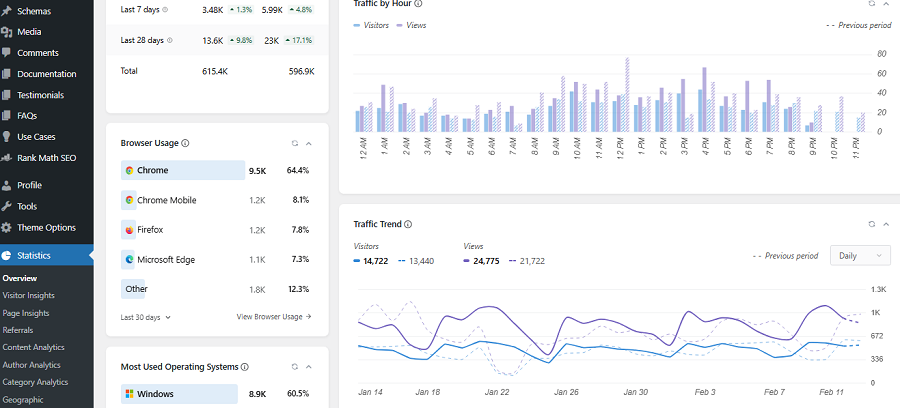
There is no single perfect tool for auditing your website. Take a look at the following table to get familiar with some useful platforms that help you track and audit your site:
| Feature | WP Statistics | GA4 | Google Search Console | Screaming Frog | PageSpeed Insights |
| Primary purpose | WordPress analytics | User analytics | Search analytics | SEO crawling | Performance testing |
| Visitor tracking | ✓ | ✓ | — | — | — |
| Page views | ✓ | ✓ | — | — | — |
| Traffic sources | ✓ | ✓ | — | — | — |
| Search queries | ✓ | — | ✓ | — | — |
| Keyword rankings | — | — | ✓ | — | — |
| Indexing analysis | — | — | ✓ | ✓ | — |
| Broken links | — | — | — | ✓ | — |
| Redirect analysis | — | — | — | ✓ | — |
| Canonical analysis | — | — | ✓ | ✓ | — |
| Meta tag analysis | — | — | — | ✓ | — |
| Core Web Vitals | — | — | ✓ | — | ✓ |
| Real-time data | ✓ | ✓ | — | — | — |
| Crawl reports | — | — | — | ✓ | — |
| WordPress integration | ✓ | ✓ | ✓ | — | — |
| Free version | ✓ | ✓ | ✓ | ✓ | ✓ |
As you see, for every purpose, you need a specific tool. There is no single tool that can handle the website audit process.
WP Statistics can help you with content analytics, author analytics, page analytics, and also checking the performance of your campaigns and goals.
If you need more information about website audits, you can count on our help.
Conclusion
Every website needs a regular audit to make sure it’s running well. Your audit should include all important factors, including crawlability and indexing, technical SEO, on-site SEO, and security. You can also double-check your privacy policy page and make sure it’s updated. Moreover, you need to use effective tools to cover all the required metrics and find friction and weaknesses. For crawling and indexing issues, you can use Google Search Console. For measuring your content and page performance, you can use WP Statistics. Moreover, for checking titles, tags, and alts, it’s good to use Screaming Frog.
FAQs
What should be included in a website audit?
Your website audit should cover key performance and SEO factors. It includes technical SEO, crawlability, indexability, on-page SEO, content quality, Core Web Vitals, mobile usability, accessibility, security, internal linking, structured data, and UX.
How do I audit my website?
You’d better build a strategy for auditing your site. You can start by crawling your website, then check indexing, technical SEO, performance, and mobile usability. After that, go for content and internal links.
How to structure a website audit?
Prioritize your audit like this: crawlability and indexing, technical SEO, on-site SEO, and security. Finally, you can also check your privacy policy and see whether it needs an update.