

Consider website speed and analytics together to have an exact overview of your site’s performance.
Table of Contents
Web analytics is essential for understanding user behavior and the quality of your content. However, it’s not enough because there are some technical factors that can impact your site’s performance.
In fact, even if you have a great content strategy and offer an interesting product/service, you might fail to attract customers due to your site’s speed and technical issues.
Here, we’ll explain how website speed and web analytics are related and how you have to analyze them together.
The Impacts of Page Speed on Website Performance
Website speed data and web analytics focus on different dimensions of user experience. Speed metrics track the technical aspects of a website and how it responds to users’ requests.
On the other hand, web analytics shows how visitors respond to the site’s quality, including technical and content aspects.
Imagine a site that loads quickly. Users feel in control and can do everything if the content is interesting. So, they explore more pages, consider more options, and interact with more elements.
Now, imagine that it loads slowly even if it has good content. The users don’t feel good about spending time on your site due to frustration.
So, you should not focus solely on content when analyzing your website’s metrics, such as session duration, bounce rate, exit rate, scroll depth, exit pages, and conversion paths. These are more useful when you track them alongside speed and performance data.
For example, if your product page has a high abandonment rate, you have to look for reasons related to speed and performance, along with content issues.
Even a delay in the display of images can make visitors leave your site before they think about your offer.
Overall, the speed of your website can influence analytics in three ways:
1. Speed Shows the Quality of Your Business
Users see the load time of your website as a sign of your brand quality. Reliable and professional businesses usually have fast websites. On the other hand, slow sites are equal to low quality. So, the speed of your site will change the purchasing decision of your visitors.
2. Website Speed Impacts Engagement
Most visitors expect instant access to services on your website. Even a small delay can lead to a significant decrease in engagement.
3. It Changes Users’ Decisions
If pages or features on your website load differently, users ignore slow ones. This way, some areas of your site are abandoned, and this causes wrong analytics. In fact, the visitors’ decision is not due to the quality of the service/product, but due to the speed or performance of the page.
Overall, analytics provide the raw behavioral patterns, and speed provides the explanation behind many of them.
When paired, they become one of the most powerful diagnostic tools available to any digital business.
What Are Website Speed Metrics?
Speed metrics measure both the technical performance of your website and the experience of its users.
There are several metrics that help you understand if your website is performing well in terms of speed.
Here are some of them:
Core Web Vitals
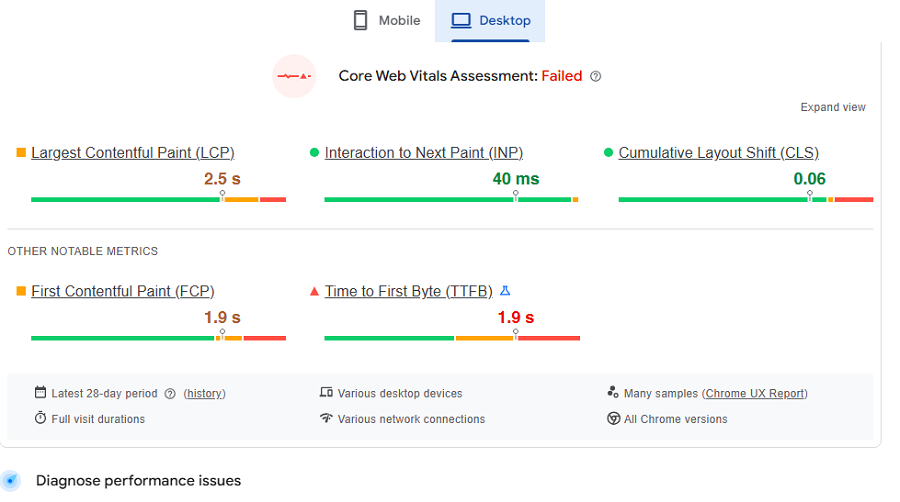
Core Web Vitals are a set of important metrics that help you measure user experience in terms of loading performance and visual stability. Using these metrics, you can understand if your site is stable, interactive, and responsive.
These metrics use three essential dimensions:
- Loading performance: This metric measures how quickly your webpage visitors can see the main content of the page. In fact, it tells if the page feels instant or sluggish.
- Interactivity: This one tracks how soon a user can actually engage with your site. It works with interactions like clicking buttons, opening menus, or going to another page on your site.
- Visual stability: As you know, when pages are loading, there might be sudden jumps or moving text. These can frustrate users and disrupt the reading or browsing. This metric measures how much the layout of your page shifts when elements are loading.
Each of these metrics focuses on a different part of the user experience. When you combine them, you’ll obtain a complete view of your site’s performance and how users feel about it.
Other Key Speed Metrics
Here are some other important metrics that help you diagnose problems with your website speed. Here is a list of these metrics:
- Time to First Byte shows how quickly your server responds.
- Total Blocking Time helps you detect JavaScript-related delays.
- First Contentful Paint measures the time it takes for the first content to appear on your page when the user tries to load it.
- Fully Loaded Time measures the time it takes for your page to be loaded with all the items, including images and scripts.
Using these metrics, you can recognize any problems regarding your website speed. Here is a summarized table that compares speed-related metrics:
| Metric | Full Name | Measuring | User Impact |
| LCP | Largest Contentful Paint | Main content load | Visibility |
| FID | First Input Delay | First interaction delay | Responsiveness |
| INP | Interaction with Next Paint | Interaction responsiveness | Smoothness |
| CLS | Cumulative Layout Shift | Layout shifts | Stability |
| TTFB | Time to First Byte | Server response | Backend speed |
| FCP | First Contentful Paint | First visual element | Feedback |
| TBT | Total Blocking Time | Script blocking | Interactivity |
| Fully Loaded | Fully Loaded Time | All resources loaded | Completion |
Best Tools to Track Website Speed
Several tools let you check your website’s speed using various metrics. If you’re looking for free tools, you can use one of the tools mentioned in the following table:
| Tool | Best For | Key Strengths | Limits |
| PageSpeed Insights | Beginners, SEO | Core Web Vitals, fixes | No history |
| GTmetrix | Deep analysis | Waterfall, video, 6-mo trends | Free tests/month limit |
| WebPageTest | Developers | Multi-location, filmstrip | Steep learning curve |
| Pingdom Tools | Quick check | Simple breakdown | Basic, no deep history |
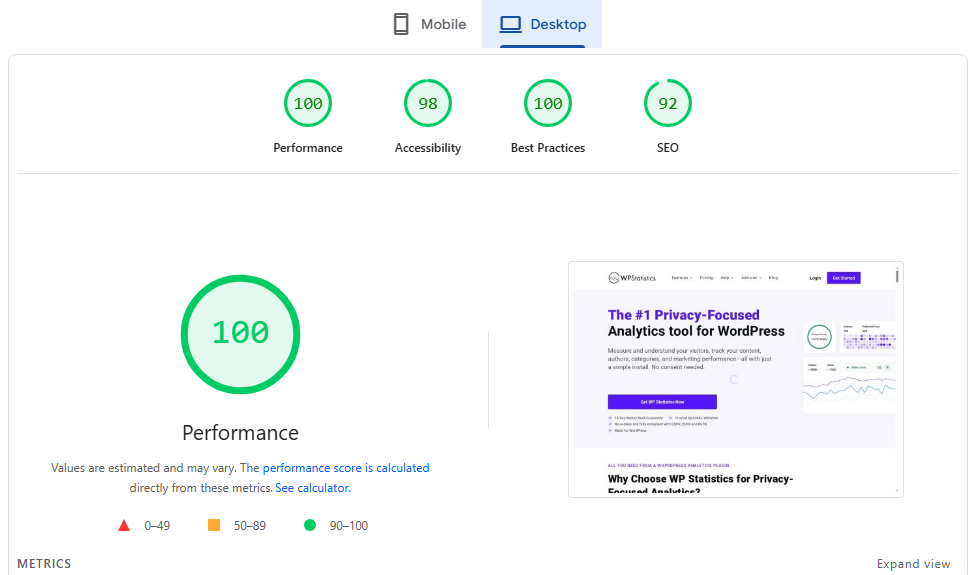
If you need something more professional, you can go for Real-User Monitoring tools. The following table lists some of the best RUM tools that are suitable for large enterprises:
| Tool | Type | Locations | RUM? | Alerts | Starter Price |
| Site24x7 | Synthetic + RUM | 130+ | Yes | Yes | $9/mo |
| Sematext | Synthetic + RUM | 30+ | Yes | Yes | $2/monitor/mo |
| Uptrends | Synthetic | 230+ | No | Yes | $7/monitor/mo |
| DebugBear | Synthetic + RUM | 20+ | Yes | Yes | Free → $29/mo |
How to Interpret Speed and Web Analytics Together
Now, let’s see how you have to use the results of web analytics and website speed tracking to optimize your site:
Speed and SEO Visibility
Search engines are increasing their focus on user experience, and speed is one of the most important signals of user experience.
When your pages load fast, search engines consider your site user-friendly and capable of satisfying users’ intent. On the other hand, slow sites usually have problems ranking well for competitive keywords.
Particularly, consider the performance and speed of your page on mobile because a majority of searches happen on mobile devices.
Speed and Bounce Rate
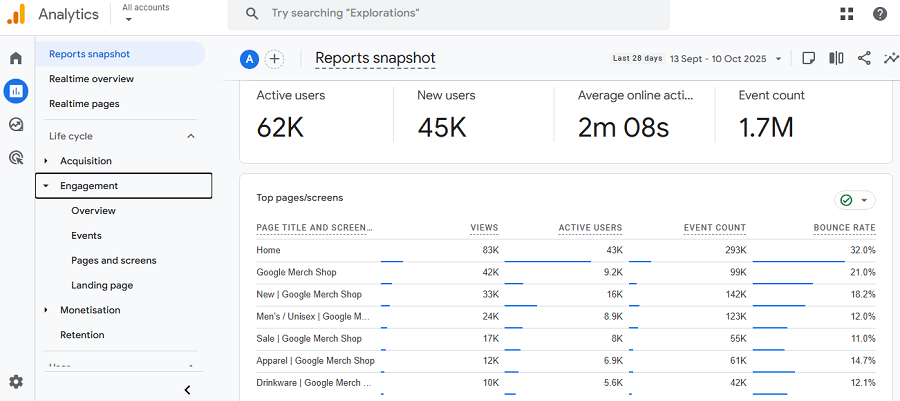
Bounce rate and speed are usually against each other. When a page loads fast, users won’t abandon it immediately because the experience feels good. On the other hand, when load time increases, the bounce rate rises sharply.
Users don’t analyze the result of the delay. They react to it and leave your website because there are numerous other competitors that provide the same content faster.
Even when your content is interesting, a sluggish interface often ends the interaction. Remember that the bounce rate doesn’t tell you why your visitor left.
You can only analyze the reason by pairing bounce rates with speed data. This way, you can understand whether the abandonment was due to content or performance.
Speed and Page Views
Fast load times encourage visitors to explore more pages on your website. When users feel comfortable with your site, they click your links because each new page loads as smoothly as the last. This increases overall page views, session depth, and time on site.
Slow load times break that journey. Even if users remain on the first page, they are less likely to visit another page.
This behavior is a usual pattern in various industries, from e-commerce to media to SaaS. Overall, we can say that the smoother the experience, the more content users willingly consume.
Speed and User Satisfaction
When users face delays on your site, they lose their trust in your brand. In fact, they think the problems might appear in your product or services, just like on your website.
They interpret the issue as outdated technology, poor organization, or low reliability.
Fast-loading pages create a sense of confidence and professionalism. Users who are satisfied with their experience on your site will likely do:
- Return to the site
- Complete actions
- Recommend the brand
- Trust
Speed and Revenue
The connection between website speed and your revenue is a proven pattern in digital business. It’s obvious that faster pages lead to higher conversion rates.
This is especially important in e-commerce because delays during critical moments, like product selection, cart updates, and checkout, have a direct impact on sales.
Speed and Conversions
Website speed usually affects more than one metric. So, you have to look for the entire conversion journey of your users to find the problem. After optimizing your site’s speed, you can expect several improvements, including:
- Reducing abandonment
- Longer sessions
- Higher engagement
- Stronger conversion rates
Looking for a Web Analytics Solution?
Until now, you’ve learned what tools you have to use to track your website’s speed. It’s also good to know the best web analytics tools for tracking your site’s performance in terms of content, user behavior, and conversion rates.
This way, you can combine the results of two platforms to have a better understanding of how your site is performing.
Here is a list of the best web analytics tools you can choose based on your requirements:
- WP Statistics
- Google Analytics
- Matomo
- Fathom
- Adobe Analytics
If you want to have a privacy-focused analytics platform right on your website, WP Statistics is the best option.
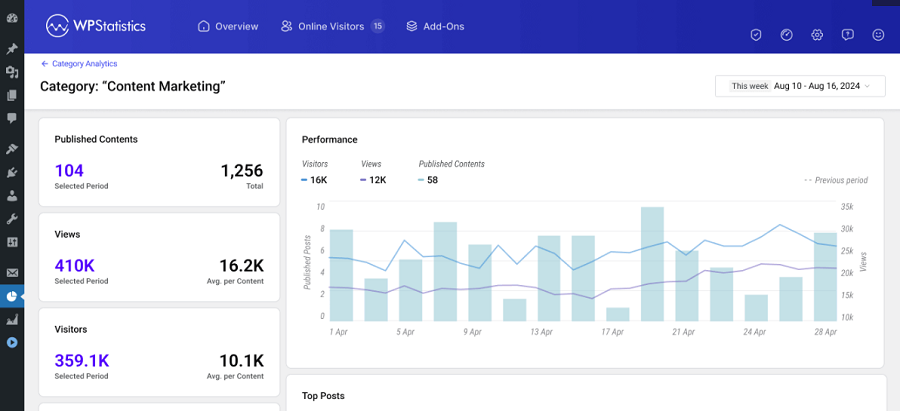
It’s really easy to use, especially for non-technical users and small website owners. Moreover, it’s GDPR-compliant by default and doesn’t share your users’ data with third-party platforms. So, you don’t need to worry about user privacy or using cookie banners on your landing pages.
It offers lots of useful features for free, and you can also go premium for more advanced analytics like Data Plus or Campaign Builder. So, why wait? Install the plugin and see its power to track activities on your website.
Conclusion
If you want to have a successful website, you can’t solely focus on web analytics and content performance.
You have to pay special attention to the technical performance of your site, especially its speed. Several important metrics show the performance of your site in terms of speed.
You can check these metrics using tools like GTmetrix and combine the data with your web analytics results to find any probable issues with your site.
Without a smart monitoring approach, you can’t detect the real problem. This way, you might focus on the wrong factors when auditing your website.
Here at WP Statistics, we can help you track your site’s performance and optimize it to get the best results.
FAQs
How do I check the speed of a website?
Use a performance testing tool that measures load time and Core Web Vitals. Most tools let you enter a URL and get instant results.
Does website speed affect SEO?
Yes. Search engines consider speed and Core Web Vitals ranking factors. Faster pages generally perform better in search results and reduce bounce rates.
What is site speed in Google Analytics?
Speed tells how quickly your pages load for real users, based on sampled performance data. This metric helps you detect slower pages, device issues, and issues that impact engagement.
What is a good speed for a website?
Pages that feel interactive within 2–3 seconds are good. Faster is always better, especially for mobile users who are less tolerant of delays.